

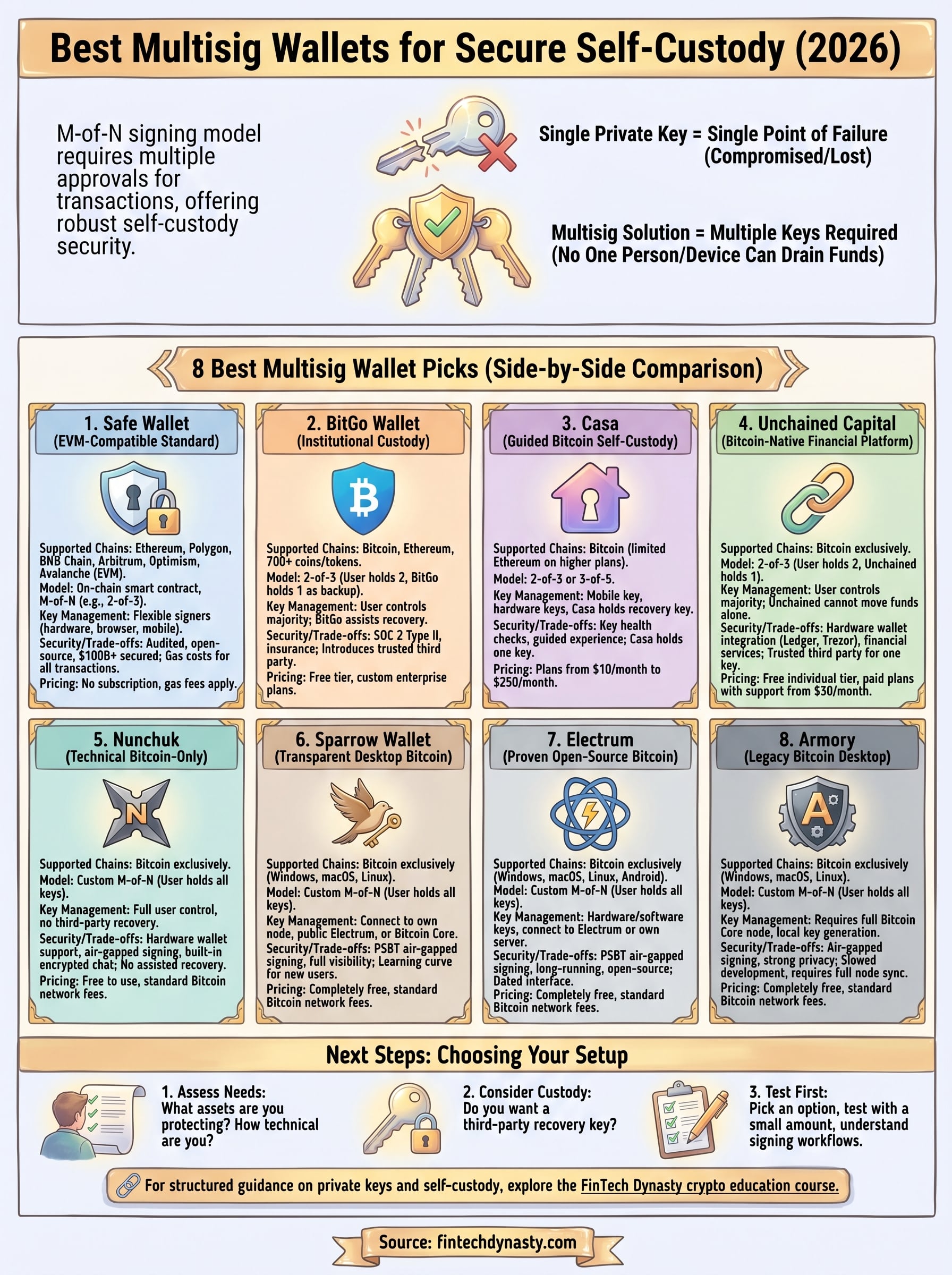
8 Best Multisig Wallet Picks for Secure Self-Custody (2026)
A single private key is a single point of failure. If it gets compromised, stolen, or lost, your crypto goes with it. That's exactly the problem multisig solves. A best multisig wallet setup requires multiple keys to authorize a transaction, which means no one person, device, or breach can drain your funds. For anyone serious about self-custody, it's one of the strongest security models available right now.
But not every multisig solution works the same way. Some are built for individuals, others for teams or DAOs. Some rely on dedicated hardware signers, while others operate entirely through software. The differences matter, especially when you're trusting this setup to protect real money over the long term.
At FinTech Dynasty, we focus on one thing: helping you understand and implement crypto security without the noise. We've researched and compared eight multisig wallets based on key management flexibility, device compatibility, open-source transparency, and real-world usability. This guide breaks down each option side by side so you can pick the setup that fits your security needs and custody strategy.
1. Safe Wallet
Safe Wallet, formerly known as Gnosis Safe, is the most widely deployed smart contract multisig in the Ethereum ecosystem. If your holdings sit primarily in EVM-compatible networks, Safe is often the first option worth evaluating when building a best multisig wallet setup for serious self-custody.
What it is and supported chains
Safe runs as an on-chain smart contract wallet that supports Ethereum, Polygon, BNB Chain, Arbitrum, Optimism, Avalanche, and most other EVM-compatible networks. It has secured over $100 billion in assets across DeFi protocols, DAOs, and individual treasuries, which gives you a real-world stress test that most wallets can't match.
Multisig model and key management
Safe uses an M-of-N signing model defined at setup. You pick how many total signers exist (N) and how many approvals are required to execute any transaction (M). A 2-of-3 configuration is the most common starting point. Each signer can be a hardware wallet, a browser extension wallet, or a mobile device, so you can spread signing authority across different devices, people, or physical locations.
Because the multisig logic lives in the smart contract itself rather than on a server, your funds remain protected even if one signer is lost or compromised, as long as you still meet the threshold.
Notable security features and trade-offs
Safe's contracts have gone through multiple independent security audits, and the code is fully open source. The main trade-off is gas cost. Every transaction requires on-chain execution and approval, which means you pay network fees each time. This makes Safe well-suited for treasury management or long-term storage but less practical for small, high-frequency transactions.
Setup and day-to-day use
You create a Safe through the web app at app.safe.global. Setup involves entering signer addresses and defining your approval threshold, which takes about ten minutes if your co-signers are ready. Day-to-day, one signer proposes a transaction, others review and approve it through the interface, and it executes once the threshold is met. The coordination requirement is real, so plan for that.
Pricing and fees
Safe Wallet charges no subscription fees. Your only costs are the network gas fees to deploy the contract and execute transactions. Deployment on Ethereum mainnet can range from a few dollars to considerably more depending on current congestion, but deploying on Layer 2 networks like Arbitrum or Optimism keeps those costs minimal.
2. BitGo Wallet
BitGo is one of the oldest and most institutionally trusted names in crypto custody, and its multisig infrastructure reflects that history. If you're managing a significant portfolio and want a regulated, professionally supported option, BitGo deserves a close look.
What it is and supported chains
BitGo supports Bitcoin, Ethereum, and over 700 other coins and tokens, including most major EVM chains and several non-EVM assets like Litecoin and XRP. This breadth makes it one of the more versatile options when you need multi-asset coverage under one multisig roof.
Multisig model and key management
BitGo uses a 2-of-3 multisig model by default. You hold two keys, and BitGo holds the third as a backup signing key. This structure ensures you retain control while giving you a recovery path if one of your keys is lost.
BitGo never uses its key to sign transactions without your authorization, which means your funds stay under your control as long as you protect your own keys.
Notable security features and trade-offs
BitGo holds a SOC 2 Type II certification and carries crime insurance, which is rare in this space. The trade-off is that it introduces an institutional third party into your best multisig wallet setup, which some self-custody purists view as a compromise.
Setup and day-to-day use
You create a wallet through BitGo's web dashboard, and the guided setup process is clear and well-documented. Signing transactions involves confirming requests through the interface using your local key.
Pricing and fees
BitGo offers a free tier for individual users with basic features. Enterprise custody plans are custom-priced based on assets under management.
3. Casa
Casa is a consumer-focused self-custody service built specifically for Bitcoin holders who want multisig security without deep technical expertise. If you're looking for a guided, opinionated approach to a best multisig wallet setup without building everything from scratch, Casa is worth your time.
What it is and supported chains
Casa focuses almost exclusively on Bitcoin, with limited Ethereum support available on higher-tier plans. The platform is intentionally narrow, which reflects its philosophy: cover one asset class well rather than stretch across every coin and token.
Multisig model and key management
Casa uses a 2-of-3 or 3-of-5 multisig model depending on your chosen plan. One key stays on your mobile device, others live on hardware wallets you control, and Casa holds a recovery key to assist you if you lose access.
Casa's recovery key cannot move funds without your co-signing, so you retain meaningful control over your assets at all times.
Notable security features and trade-offs
Casa's key health check feature regularly prompts you to verify that each signing device still works, which cuts the risk of discovering a failed key only when you need it most. The trade-off is that Casa holds one key in the setup, which introduces a trusted third party into your custody model.
Setup and day-to-day use
You manage everything through Casa's mobile app, which walks you through hardware wallet pairing and transaction signing with clear step-by-step instructions. The experience is more guided than technical, making it accessible for users who are new to multisig.
Pricing and fees
Casa offers plans starting at $10 per month for the basic 2-of-3 configuration, with the 3-of-5 setup available on higher-tier plans reaching up to $250 per month, which also includes additional concierge-style support.
4. Unchained Capital
Unchained Capital positions itself as a Bitcoin-native financial platform that combines multisig security with practical services like Bitcoin-backed loans and IRAs. It occupies a unique space where you get serious self-custody infrastructure alongside real financial utility, without surrendering control of your private keys.
What it is and supported chains
Unchained Capital focuses exclusively on Bitcoin and does not support other cryptocurrencies. That narrow focus allows the platform to go deep on Bitcoin-specific security standards rather than spreading its attention across dozens of assets.
Multisig model and key management
The platform uses a 2-of-3 multisig model where you hold two keys on hardware devices you own and Unchained holds the third as a recovery key. Your two keys give you the majority of signing authority, so Unchained cannot move your Bitcoin without your direct participation.
Because you hold two of the three keys, no action happens on your vault unless you initiate it.
Notable security features and trade-offs
Unchained integrates directly with Ledger and Trezor hardware wallets, which makes it a strong choice when you want a best multisig wallet setup backed by proven cold storage devices. The trade-off mirrors what you see with BitGo and Casa: Unchained holds one key, which introduces a trusted third party into your custody model.
Setup and day-to-day use
You create your vault through Unchained's web-based interface, pairing your hardware wallets through a guided flow that walks you through each step. Signing transactions requires two hardware wallet confirmations, which stays manageable once the initial setup is behind you.
Pricing and fees
Unchained offers a free individual tier that covers basic vault functionality with no monthly fee. Paid plans with concierge key support and additional services start at $30 per month for users who want hands-on assistance.
5. Nunchuk
Nunchuk is a Bitcoin-only multisig wallet that gives technically inclined users full control over their signing setup without relying on any third party to hold a key. If you want a best multisig wallet solution where every key lives under your direct control and no company can interfere with your funds, Nunchuk is one of the strongest options available.
What it is and supported chains
Nunchuk supports Bitcoin exclusively and makes no apologies for that focus. The app runs on desktop (Windows, macOS, Linux) and mobile (iOS, Android), giving you flexibility in how you coordinate signatures across multiple devices.
Multisig model and key management
Nunchuk lets you define your own M-of-N signing configuration, from a basic 2-of-3 to more complex arrangements. Every key in the setup belongs to you, which means no third party holds a recovery key or backup signer in your vault.
This pure self-custody model is powerful, but it puts full responsibility for key backup and recovery directly on your shoulders.
Notable security features and trade-offs
Nunchuk integrates with major hardware wallets including Coldcard, Trezor, and Ledger, and it supports air-gapped signing through PSBT (Partially Signed Bitcoin Transactions). The main trade-off is that no assisted recovery option exists if you lose a signing device.
Setup and day-to-day use
You configure a multisig vault by adding signers through the app's guided interface, which supports both hardware wallets and software keys. Transaction coordination happens through Nunchuk's built-in encrypted chat, letting co-signers approve transactions without routing through a separate messaging service.
Pricing and fees
Nunchuk is free to use with no subscription required. Your only ongoing cost is the standard Bitcoin network transaction fee when you broadcast a signed transaction.
6. Sparrow Wallet
Sparrow Wallet is a free, open-source Bitcoin wallet designed for users who want full visibility into what their wallet is doing and why. It occupies a sweet spot between raw technical power and a usable desktop interface, making it a strong candidate for your best multisig wallet setup if you prefer software that shows you everything rather than hiding complexity behind an abstraction layer.
What it is and supported chains
Sparrow runs on Windows, macOS, and Linux and supports Bitcoin exclusively. It connects to your own full node, a public Electrum server, or Bitcoin Core, giving you flexibility in how you verify transactions without relying on third-party servers you can't audit.
Multisig model and key management
Sparrow supports custom M-of-N multisig configurations and works with hardware wallets including Coldcard, Trezor, Ledger, and Keystone. You control every key in your setup, with no third party holding a backup signer.
This zero-custodian model puts full recovery responsibility on you, so invest time in a thorough seed backup process before funding the wallet.
Notable security features and trade-offs
Sparrow supports PSBT-based air-gapped signing, which lets you coordinate transactions between offline hardware devices without exposing private keys to an internet-connected machine. The trade-off is that the interface has a learning curve for users who are new to Bitcoin internals.
Setup and day-to-day use
You download Sparrow from the official project repository and verify the release signature before installing. Setting up a multisig wallet involves importing each signer's public key, then defining your threshold.
Pricing and fees
Sparrow is completely free with no subscription or licensing cost. You pay only standard Bitcoin network fees when broadcasting transactions.
7. Electrum
Electrum is one of the longest-running Bitcoin wallets available, first released in 2011 and still actively maintained today. Its multisig functionality makes it a reliable pick for technically confident users who want a proven, open-source foundation for their best multisig wallet setup without paying a subscription.
What it is and supported chains
This wallet supports Bitcoin exclusively and runs on Windows, macOS, and Linux, with an Android version also available. You can connect it to Electrum servers for transaction verification, or point it at your own server if you prefer not to rely on public infrastructure.
Multisig model and key management
Electrum lets you configure a custom M-of-N signing arrangement where every key stays under your control. You can combine hardware wallet signers from Ledger, Trezor, or Coldcard with software keys, giving you flexibility in how you distribute signing authority.
Every key in your Electrum multisig belongs entirely to you, with no third party holding a recovery signer.
Notable security features and trade-offs
The wallet supports PSBT-based signing and air-gapped transaction workflows, which keeps your private keys off internet-connected machines. The main drawback is that the interface feels dated, and new users often find the terminology and configuration steps steep compared to more modern alternatives.
Setup and day-to-day use
You download Electrum from the official project site and verify the GPG signature before installing. Creating a multisig wallet walks you through adding each cosigner's public key and defining your threshold through a step-by-step wizard.
Pricing and fees
Electrum is completely free to download and use. Your only cost is the standard Bitcoin network fee when you broadcast a signed transaction.
8. Armory
Armory is a Bitcoin-only desktop wallet that was one of the first applications to bring multisig functionality to individual users back in the early 2010s. It targets technically advanced users who want deep control over their signing setup without depending on any external service.
What it is and supported chains
Armory supports Bitcoin exclusively and runs on Windows, macOS, and Linux. It connects directly to a local Bitcoin Core node for transaction verification, which means you validate your own data rather than trusting a third-party server with your transaction history.
Multisig model and key management
You configure a custom M-of-N multisig setup where every key stays under your control. Armory generates and manages each signing key locally, with no third party holding a backup or recovery key in your vault.
Because Armory requires a full Bitcoin Core node, your transaction data never touches an external server, which gives you a strong privacy baseline alongside your multisig security.
Notable security features and trade-offs
Armory's air-gapped signing capability lets you sign transactions on a completely offline machine and broadcast them separately from an online one. The significant trade-off is that active development has slowed considerably in recent years, which raises real questions about long-term maintenance and vulnerability patching.
Setup and day-to-day use
Setting up Armory requires syncing a full Bitcoin Core node first, which demands significant storage space and time. Once synced, you create your best multisig wallet configuration through the desktop interface by adding each signer's public key and setting your threshold.
Pricing and fees
Armory is completely free and open source. Your only cost is the standard Bitcoin network fee when you broadcast a signed transaction.
Next Steps
Choosing the best multisig wallet comes down to what you're protecting, how technical you're comfortable getting, and whether you want a third party holding a recovery key. If you hold significant Bitcoin long-term, options like Nunchuk, Sparrow, or Casa give you strong security at different levels of hands-on involvement. For EVM-based assets and DeFi, Safe Wallet remains the clear standard. BitGo and Unchained work well when you want institutional-grade infrastructure without building everything yourself.
Your next move is to pick one option, test it with a small amount first, and work through the full setup before committing larger holdings. Understanding the fundamentals behind private keys, seed phrases, and signing workflows will make that process far smoother. If you want structured guidance on those concepts before you dive in, the FinTech Dynasty crypto education course covers all of it in a clear, practical format built for real self-custody.