

What Is a Hardware Wallet? How It Works for Crypto Security
Leaving cryptocurrency on an exchange means trusting someone else with your private keys. When that exchange gets hacked, or goes bankrupt, your funds can vanish overnight. So what is a hardware wallet, and why do millions of long-term holders rely on them to protect their assets?
At FinTech Dynasty, we focus on practical crypto security without the speculation and hype. This article explains how hardware wallets store your private keys offline, why that isolation matters for protecting digital wealth, and what trade-offs to consider before making a purchase. By the end, you'll understand how these devices actually work and whether one fits your security needs.
Why hardware wallets matter for crypto security
Every cryptocurrency transaction requires a private key to authorize the movement of funds. When you store those keys on an internet-connected device or leave them with an exchange, you create multiple points of failure that hackers can exploit. Understanding what is a hardware wallet and why it isolates your keys from online threats becomes critical when you realize how often centralized platforms get compromised.
Exchange vulnerabilities expose your funds
You don't actually own cryptocurrency when you hold it on an exchange. The platform controls the private keys, which means you depend entirely on their security infrastructure and operational integrity. FTX collapsed in November 2022, locking out billions in customer assets overnight. Mt. Gox lost 850,000 Bitcoin in 2014. Celsius froze withdrawals before bankruptcy. Each failure followed the same pattern: users trusted a third party, and that trust was broken.
Storing crypto on an exchange means accepting that your access depends on someone else's decisions, technical competence, and honesty.
Exchanges face constant hacking attempts because they hold concentrated pools of value in hot wallets connected to the internet. Even major platforms with robust security teams have been breached. When attackers succeed, customers often wait years for partial recoveries through bankruptcy proceedings, if they recover anything at all.
Hot wallets create constant attack surfaces
Software wallets on your phone or computer offer convenience but maintain your private keys in an internet-connected environment. Malware can scan your device's memory for key material. Phishing sites can trick you into entering your seed phrase into a fake interface. Clipboard hijackers replace copied wallet addresses with attacker-controlled addresses right before you paste them into a transaction.
Mobile wallets face additional risks from app store compromises and operating system vulnerabilities. Your keys exist in a system that constantly communicates with external servers, downloads updates, and runs third-party code. Each of these connections represents a potential exploit vector. Attackers only need to succeed once, while you need to defend against every possible attack, every single day.
Hardware wallets isolate your private keys
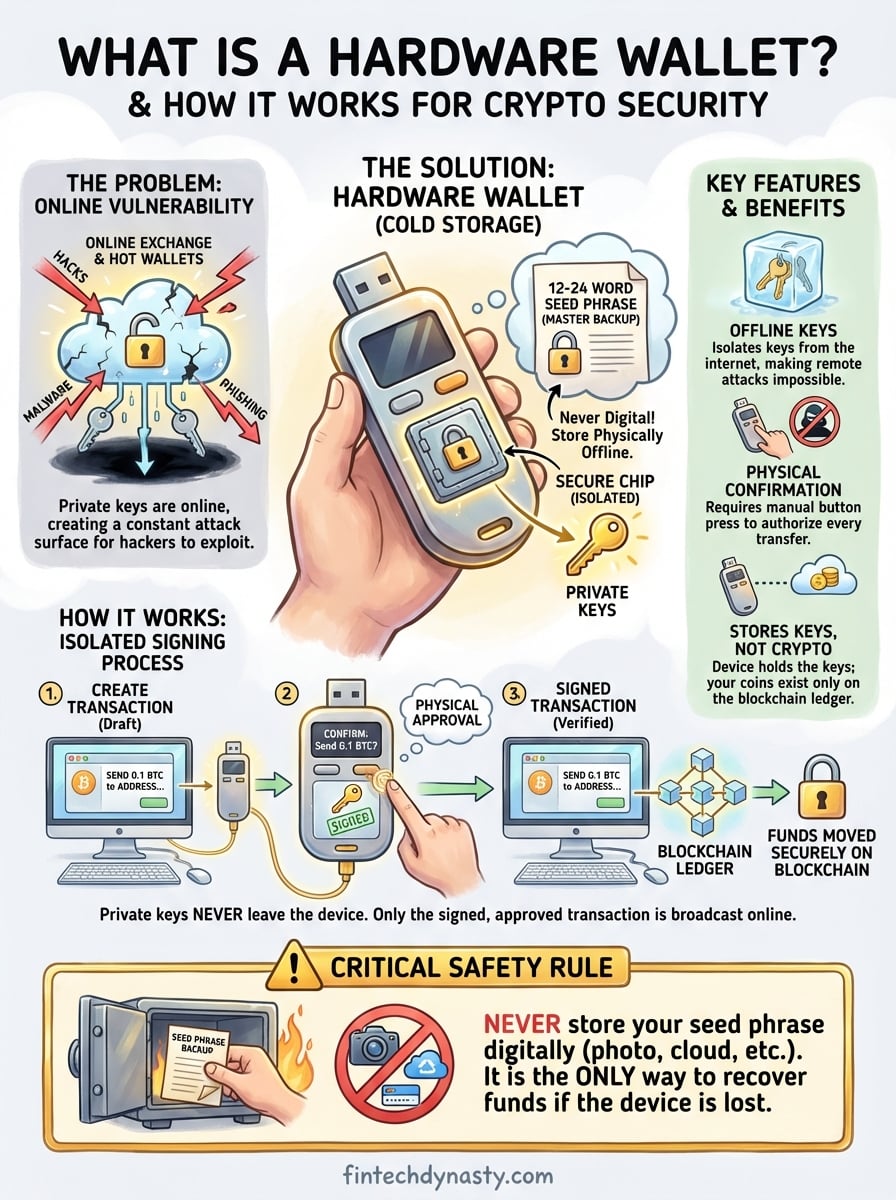
Hardware wallets move your private keys into a dedicated physical device that never connects directly to the internet. When you want to send cryptocurrency, your computer or phone creates the transaction and sends it to the hardware wallet. The device signs the transaction internally using your private key, then sends only the signed transaction back to your connected device for broadcast to the blockchain.
This air-gapped design prevents remote attacks because your keys never leave the secure chip inside the device. Even if your computer is infected with malware, attackers cannot extract your private key because it never touches the compromised system. You must physically press buttons on the hardware wallet to confirm each transaction, which stops unauthorized transfers even if someone gains control of your computer.
The secure element chip inside quality hardware wallets resists physical tampering and side-channel attacks. These specialized processors store your seed phrase in a way that makes extraction extremely difficult, even for someone with physical access to your device. Combined with PIN protection and optional passphrase features, hardware wallets create multiple layers of defense that hot wallets and exchanges simply cannot match.
What a hardware wallet actually stores
Hardware wallets confuse many newcomers because they don't store cryptocurrency itself. Your Bitcoin, Ethereum, or any other digital asset exists only on the blockchain ledger. Understanding what is a hardware wallet means recognizing that it secures the cryptographic keys that give you authority to move those blockchain records, not the coins themselves.
Your seed phrase is the foundation
When you initialize a hardware wallet, the device generates a 12 to 24-word seed phrase through a random process. This sequence of words represents a massive number that serves as the master key to all your cryptocurrency addresses. The hardware wallet stores this seed phrase in its secure chip, where it remains isolated from any internet connection or external access.
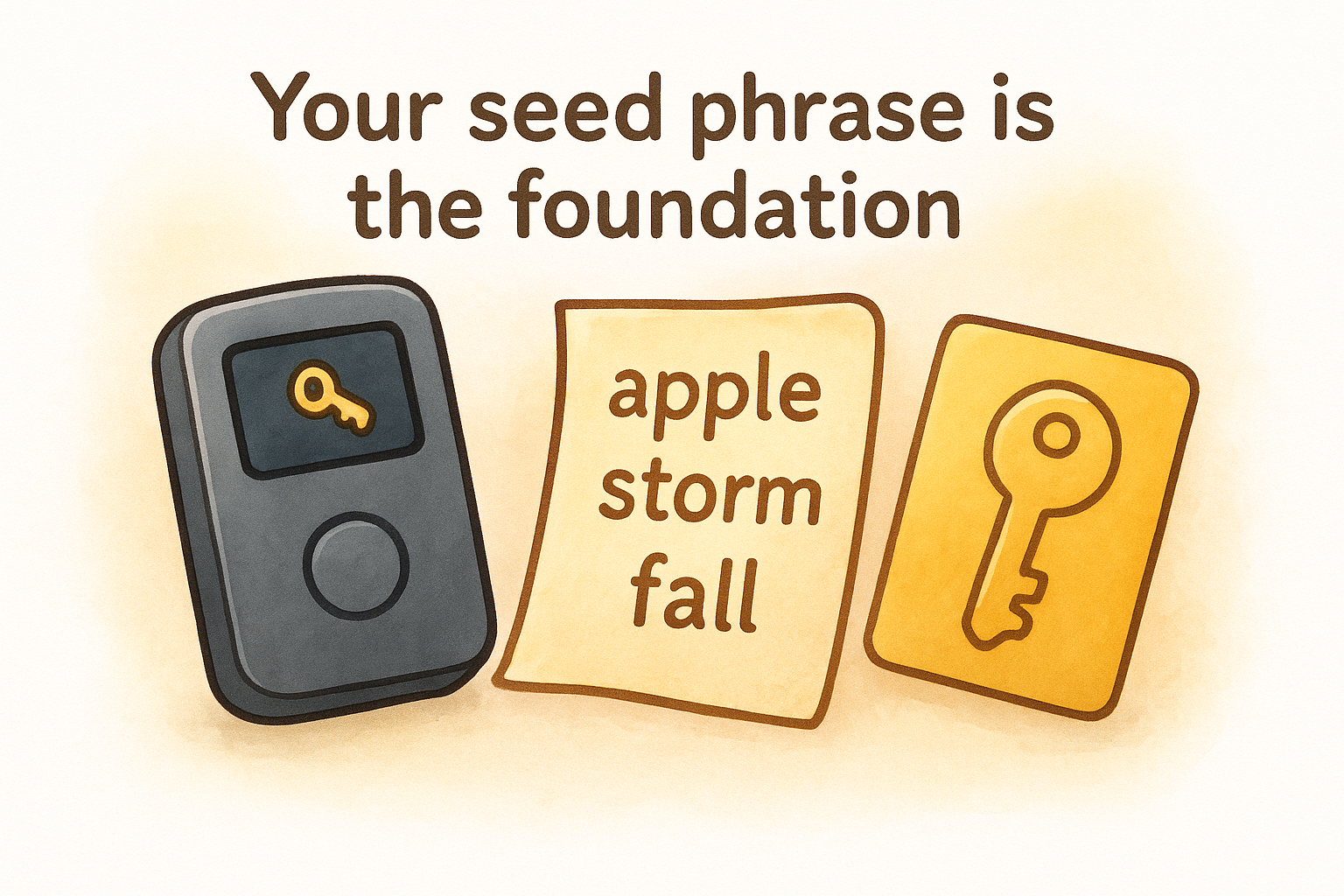
You write down this seed phrase on paper during setup because it functions as your complete backup. If your hardware wallet breaks, gets lost, or stops working, you can buy any compatible device and restore full access using those words. The seed phrase represents total ownership. Anyone who controls those words controls every address and all funds derived from them.
Your seed phrase is more valuable than the hardware wallet itself. Lose the device, and you can recover. Lose the seed phrase, and your cryptocurrency becomes permanently inaccessible.
Private keys derived from your seed
Your hardware wallet uses the seed phrase to mathematically generate private keys for different cryptocurrency accounts. Each blockchain requires its own key format, and the device creates these automatically using standardized derivation paths. A single seed phrase can produce keys for Bitcoin, Ethereum, and hundreds of other assets.
Private keys never leave the secure chip during normal operation. When you need to sign a transaction, the hardware wallet performs the cryptographic signing internally and only outputs the completed signature. This isolation prevents malware on your computer from capturing key material, even while you actively use the device.
What stays on the blockchain
The blockchain itself maintains the record of which addresses hold specific amounts of cryptocurrency. Your hardware wallet contains no coin balances or transaction history. It only stores the keys that prove you control certain addresses. When you check your balance through wallet software, the program queries the blockchain directly and displays information about the addresses associated with your hardware wallet's keys.
This architecture means your cryptocurrency remains accessible on the blockchain regardless of what happens to your hardware wallet. The device simply provides the authorized signature needed to create valid transactions that transfer ownership from addresses you control to new destinations.
How a hardware wallet works step by step
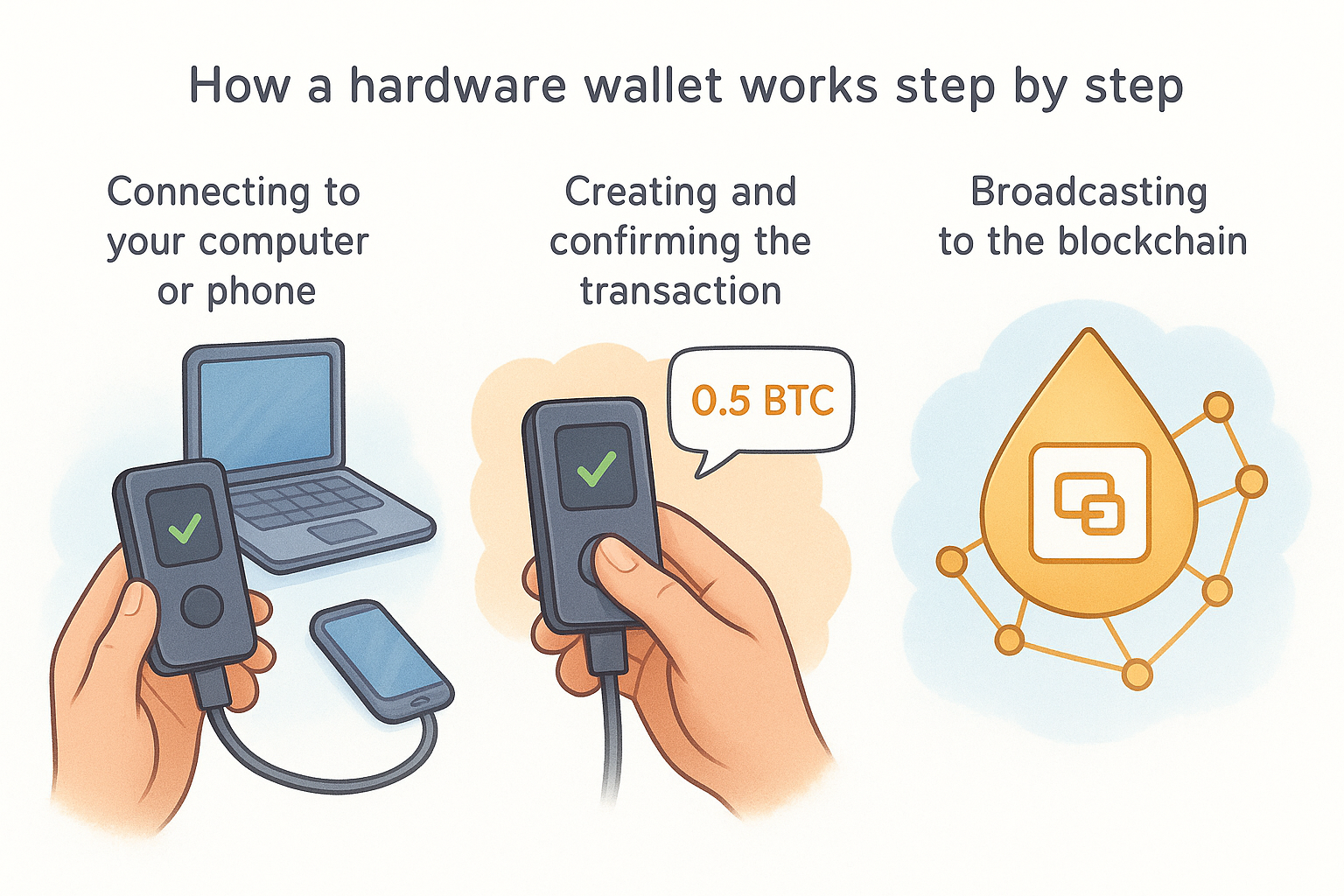
When you need to send cryptocurrency, your hardware wallet performs a secure signing process that keeps your private keys isolated at every stage. The device acts as a transaction authorizer rather than a payment terminal, which means it never exposes your keys to the computer or phone you use for everyday internet access. Understanding what is a hardware wallet requires seeing how this multi-step process protects you from remote attacks while still allowing convenient transactions.
Connecting to your computer or phone
You plug your hardware wallet into your computer via USB cable or connect wirelessly through Bluetooth on supported models. The device establishes communication with your wallet software, which might be the manufacturer's official app or a third-party interface like Electrum for Bitcoin. Your computer can now request information about your public addresses and balances, but it cannot access your private keys because those remain locked inside the hardware wallet's secure chip.
Creating and confirming the transaction
Your wallet software builds a transaction draft that specifies the recipient address, the amount you want to send, and the network fee. This unsigned transaction gets sent to your hardware wallet through the USB or Bluetooth connection. The device displays the transaction details on its own screen, showing you the destination address and exact amount. You verify these details match your intention, then press the physical button on the device to approve.
The hardware wallet signs the transaction inside its secure chip using your private key. This cryptographic signature proves you authorized the transfer without ever revealing the key itself. The signed transaction travels back to your wallet software, which now holds a valid, authorized transaction ready for broadcast.
Your private key completes the entire signing process without leaving the hardware wallet, which prevents malware from intercepting key material even while you actively use the device.
Broadcasting to the blockchain
Your wallet software takes the signed transaction and sends it to the blockchain network through internet-connected nodes. Miners or validators include your transaction in the next block, and the transfer completes. Your hardware wallet never connects directly to the internet during this process. It only handles the cryptographic signing while your internet-connected device manages the blockchain communication.
Hardware wallet vs hot wallet vs cold wallet
The terms "hot wallet," "cold wallet," and "hardware wallet" describe different approaches to storing your private keys. Each method balances security against convenience differently, and understanding these trade-offs helps you choose the right storage solution for your needs. Some confusion exists because hardware wallets fall under the cold wallet category, but not all cold wallets are hardware devices.
Hot wallets keep keys online
Hot wallets store your private keys on internet-connected devices like your phone, computer, or web browser. MetaMask, Trust Wallet, and exchange accounts all qualify as hot wallets because your keys remain exposed to network traffic and potential remote attacks. You can send cryptocurrency instantly without unplugging anything or pressing physical buttons, which makes hot wallets convenient for frequent transactions and small amounts.
The constant internet connection creates continuous attack surfaces that hackers can exploit through malware, phishing, or software vulnerabilities. Your keys exist in an environment where countless applications, browser extensions, and system processes could potentially access them. Hot wallets work well for amounts you can afford to lose or for spending money you use regularly, but they fail as long-term storage for significant wealth.
Cold wallets stay offline
Cold wallets keep your private keys completely disconnected from the internet. Paper wallets with printed keys, USB drives with encrypted key files, and hardware wallets all qualify as cold storage because they isolate your keys from network-based threats. This offline status makes remote hacking impossible, though it requires more steps to complete transactions.
Cold storage eliminates entire categories of attacks by removing the network connection that remote attackers need to reach your keys.
Paper wallets and USB drives create new problems because they lack secure input and output systems. You must eventually connect them to an internet-enabled device to sign transactions, which exposes your keys during that critical moment. These methods also degrade physically over time and offer no protection against someone who gains physical access.
Hardware wallets deliver practical cold storage
Hardware wallets function as specialized cold storage devices designed for regular use. They maintain your keys offline while providing secure transaction signing through dedicated screens and physical buttons. Unlike paper wallets, you never need to expose your private keys to an internet-connected computer. Unlike exchange custody, you maintain direct control without depending on third-party infrastructure.
Understanding what is a hardware wallet means recognizing how it bridges the gap between hot wallet convenience and cold wallet security. You get protection against remote attacks while keeping the ability to send transactions whenever needed, making hardware wallets the practical choice for serious cryptocurrency holders.
How to set up and use a hardware wallet safely
Setting up a hardware wallet requires careful attention during initialization because mistakes in this process can create security vulnerabilities or permanent loss of access. Understanding what is a hardware wallet also means knowing how to configure it correctly from the start, which protects you against both technical errors and physical threats. The process takes only 15 to 30 minutes but establishes the foundation for all your future crypto security.
Initial setup and seed phrase backup
You start by powering on your new hardware wallet and choosing to create a new wallet rather than restore an existing one. The device generates your 12 to 24-word seed phrase through its internal random number generator, displaying each word on the screen for you to write down. Use the physical paper backup cards included with your device rather than taking screenshots or typing the words into any digital system.
Your seed phrase written on paper becomes the only backup that can recover your funds if the device fails, which means this step determines whether you can access your cryptocurrency years from now.
Write clearly and double-check each word against the device screen. Store this backup in a secure physical location separate from your hardware wallet, such as a fireproof safe or safety deposit box. Some users split backups across multiple locations, though this creates complexity. Never photograph your seed phrase or store it in cloud services, password managers, or any internet-connected system.
Making your first transaction
Connect your hardware wallet to your computer and open the manufacturer's wallet software or a compatible third-party application. The software displays your addresses and lets you receive cryptocurrency by copying your public address and sharing it with the sender. These receiving transactions require no action from your hardware wallet because they only involve the blockchain recording incoming transfers.
Sending cryptocurrency requires you to enter the recipient address and amount in your wallet software, then connect your hardware wallet to approve. The device displays the exact transaction details on its built-in screen. Verify the recipient address matches what you intended, check the amount carefully, then press the physical button to authorize. Start with small test transactions to confirm the process works correctly before moving larger amounts.
Risks and common mistakes to avoid
Hardware wallets provide strong security, but user errors can eliminate those protections entirely. Understanding what is a hardware wallet includes recognizing how incorrect usage patterns create vulnerabilities that attackers actively exploit. Most cryptocurrency losses from hardware wallets trace back to preventable mistakes during setup, storage, or daily use rather than technical failures in the devices themselves.
Compromising your seed phrase backup
You defeat your hardware wallet's security when you store your seed phrase digitally in any form. Taking photos of your backup, typing words into password managers, or storing them in cloud services exposes your keys to the same remote attack vectors that hardware wallets are designed to eliminate. Attackers specifically target cloud accounts and password managers because users frequently store seed phrases there despite warnings.
Physical storage creates different risks when you keep your seed phrase and hardware wallet together in the same location. A thief who steals both can access your funds immediately. Split these items across separate secure locations, and consider whether family members or other trusted individuals need to know where you stored backups in case something happens to you.
Storing your seed phrase digitally transforms your hardware wallet into an expensive version of a hot wallet with no actual security benefit.
Buying devices from untrusted sources
Purchasing hardware wallets from third-party resellers or used marketplaces exposes you to tampered devices that could contain pre-configured seed phrases or modified firmware. Attackers buy legitimate devices, record the seed phrase during initialization, reseal the packaging, then sell these compromised units to unsuspecting buyers. Always order directly from manufacturer websites to avoid supply chain attacks.
Ignoring firmware updates and verification
You create security gaps when you skip firmware updates that patch discovered vulnerabilities. Manufacturers release these updates specifically to address newly identified attack methods, and delaying installation leaves your device exposed. Similarly, failing to verify your device's authenticity through the manufacturer's verification process means you cannot confirm whether someone modified your hardware before it reached you.
Next steps for protecting your crypto
Understanding what is a hardware wallet gives you the foundation, but taking action separates knowledge from actual security. You now know how these devices isolate your private keys from internet-based threats and why that isolation matters for long-term cryptocurrency storage. The technical details make sense, and the risks of alternative storage methods have become clear.
Your next move depends on your current situation. If you hold crypto on exchanges, research which hardware wallet models match your needs and budget, then order directly from the manufacturer. Already own a hardware wallet? Verify your seed phrase backup remains secure in a separate physical location and check for pending firmware updates.
FinTech Dynasty provides detailed comparisons of major hardware wallets, setup tutorials, and practical security guides that help you move beyond theory into implementation. Start protecting your digital wealth today rather than waiting for the next exchange failure to force your hand.