

Cold Storage Wallet Explained: How It Works And Its Safety
Leaving your crypto on an exchange means trusting someone else with your money. If that exchange gets hacked, freezes withdrawals, or goes bankrupt, your funds go with it. A cold storage wallet explained simply is a device that holds your private keys completely offline, removing the biggest attack vector in crypto: the internet.
But how does that actually work? What makes cold storage different from the wallet app on your phone, and which devices are worth your money? These are the exact questions this article answers, step by step, from the basic mechanics of offline key storage to the security tradeoffs between hot and cold wallets.
At FinTech Dynasty, we focus exclusively on helping people understand and implement self-custody, no price predictions, no trading signals, just practical security knowledge. This guide draws from our ongoing research and hands-on testing of hardware wallets like Ledger, Trezor, Tangem, and others to give you a clear, honest breakdown of what cold storage is, how it protects your assets, and how to choose the right device for your situation.
Why cold storage matters for crypto security
Crypto theft is not rare. It is systematic, ongoing, and increasingly sophisticated. Hackers do not need to target you personally; they target the platforms that hold your funds on your behalf. When you leave your coins on an exchange, you are essentially holding an IOU rather than actual crypto, and that distinction matters more than most people realize.
The real attack surface in crypto
Every time your private keys touch the internet, they become vulnerable to interception, malware, and remote theft. Hot wallets, exchange accounts, and browser-based wallet extensions all share one critical weakness: they are connected. That connection is convenient, but it is also the primary reason billions of dollars in crypto have been stolen over the past decade. Attackers use phishing emails, clipboard hijackers, keyloggers, and compromised software updates to extract private key information without you ever knowing it happened.
Your private key is the only proof of ownership in crypto. Whoever holds it, owns the funds.
The threat is not limited to sophisticated state-sponsored hackers. Tools for stealing crypto keys are widely available on underground forums, and many attacks are fully automated scripts running at scale. A single vulnerable browser extension or reused password can be enough. The more activity that happens online, the larger your exposure window becomes.
What exchange failures actually cost holders
Exchange hacks are a consistent pattern in crypto history, not edge cases. Mt. Gox lost approximately 850,000 Bitcoin before collapsing in 2014. FTX, once one of the largest exchanges in the world, collapsed in 2022 and left customers unable to access billions of dollars in funds. These were not fringe platforms. They were trusted, regulated, and widely used services with millions of active users.
When an exchange freezes withdrawals or files for bankruptcy, your legal claim to your crypto becomes a creditor claim in bankruptcy court. You get in line with everyone else. Recovery can take years, and full recovery rarely happens. This is not a hypothetical risk. It is a documented, repeating pattern, and every year new examples add to the list.
Why self-custody changes the equation
Self-custody means you hold your private keys directly, and no platform or third party can freeze, seize, or lose your funds on your behalf. With cold storage wallet explained at its core, the concept is about shifting control: instead of trusting an exchange's servers, you store your keys on a physical device that stays offline during the critical signing process.
This approach does not eliminate all risk. Self-custody introduces its own responsibilities, including secure seed phrase storage and physical device protection. But it removes the most common and most catastrophic risk category: third-party failure. No one can hack your funds through someone else's infrastructure. The only way someone accesses your assets is by getting your physical device and your recovery phrase at the same time.
For long-term holders especially, the math is straightforward. The longer you hold crypto, the more exposure time you accumulate on an exchange. Self-custody shortens that window to zero ongoing exposure after the initial setup. That is the core reason cold storage matters, and it is why understanding how it works is one of the most important protective steps you can take for your crypto holdings.
How a cold storage wallet works
Understanding the mechanics behind cold storage makes everything else click. Your cold storage wallet does not actually "store" cryptocurrency the way a physical wallet holds cash. Your crypto lives on the blockchain, and your wallet stores the private keys that prove ownership and authorize transactions. The device keeps those keys isolated from any internet connection, which is the core of its security model.
Private keys and what they actually control
A private key is a long string of cryptographic data that serves as the master password to your funds. Anyone who possesses your private key can move your crypto, with no identity verification, no bank approval, and no way to reverse the transaction. When you set up a cold storage wallet, the device generates your private key internally and never exposes it to a connected computer or phone. The key stays on the hardware itself.
Your recovery phrase (also called a seed phrase) is a human-readable version of that private key, typically 12 to 24 words. It is generated at setup and must be written down and stored physically. If your device is lost or damaged, your seed phrase is the only way to recover access to your funds. This is why protecting it matters just as much as protecting the device itself.
Your seed phrase is your actual wallet. The hardware device is just a tool to access it.
The signing process: how transactions happen offline
When you want to send crypto, your cold storage wallet handles the most sensitive step: signing the transaction with your private key. This signing happens entirely inside the device, never on your computer. Your computer or phone creates the unsigned transaction, passes it to the device, and the device signs it internally before sending back only the completed output.
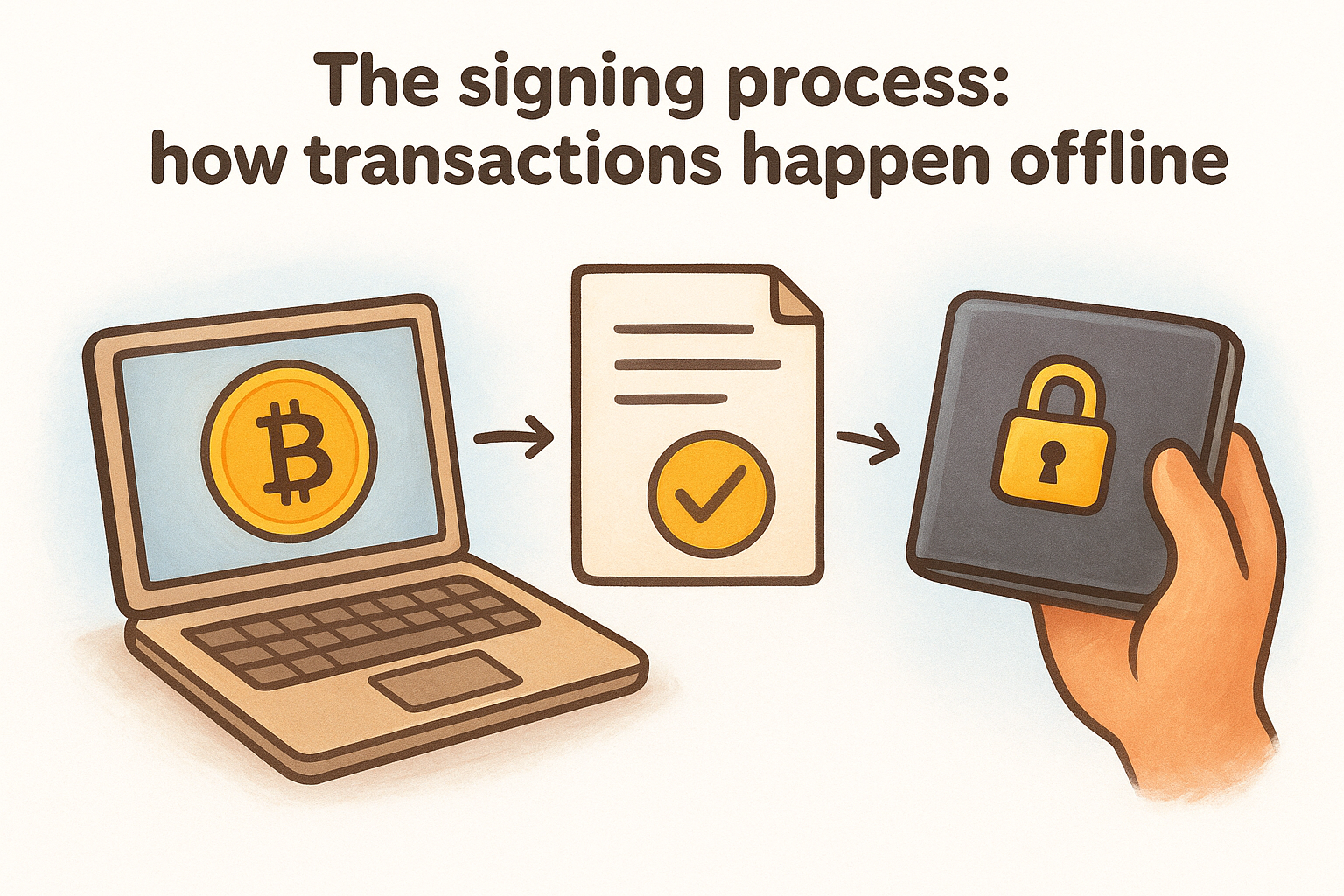
With a cold storage wallet explained this way, the key insight is that your private key never leaves the hardware, even during an active transaction. The internet-connected device you use, whether a computer or phone, never sees the key itself, only the final signed transaction ready for broadcast. This architecture is what separates cold storage from every software wallet solution available.
Cold vs hot wallets and custody options
The choice between hot and cold storage is the most fundamental decision in crypto security. Hot wallets stay connected to the internet, cold wallets stay offline, and that single difference creates a significant gap in risk exposure. Understanding where each type fits helps you build a storage strategy that actually matches how you hold and use your crypto.
What makes a hot wallet different
Hot wallets include mobile apps, browser extensions, and desktop software like MetaMask, Trust Wallet, or Exodus. They are convenient because they give you instant access to your funds for trading, swapping, or connecting to decentralized applications. That convenience comes with a cost: your private keys are either stored on an internet-connected device or managed by software that interacts with the web continuously.
If malware reaches your device while a hot wallet is installed, your private keys are reachable without you ever knowing it happened.
Every transaction you sign through a hot wallet happens in an environment exposed to the same threats as your browser and operating system. Phishing attacks, compromised app updates, and clipboard hijackers all target this layer directly, making hot wallets a poor fit for holding significant long-term balances.
Custody models and what they mean for your control
Beyond hot and cold, custody breaks into two categories: custodial and non-custodial. Custodial means a third party, typically an exchange, holds your private keys and manages access on your behalf. Non-custodial means you control the keys directly, which is the foundation of self-custody.
With a cold storage wallet explained in this context, the device is the practical tool for non-custodial storage at its most secure level. Exchanges make sense for active trading, but they are not a storage solution. Keeping long-term holdings on an exchange means accepting third-party risk indefinitely, and the documented history of exchange failures makes that a difficult position to defend.
A sound approach for most holders is to use a cold wallet for long-term savings and a hot wallet with a small, limited balance for everyday transactions. That split reduces your exposure while keeping daily usability intact.
Types of cold storage wallets
Not all cold storage devices work the same way. The category breaks into distinct types based on how they connect to your computer or phone and how transactions get signed. Each type carries its own security tradeoffs, and knowing the difference helps you pick a device that fits your actual usage and risk tolerance.
Hardware wallets with wired or wireless connections
Hardware wallets like Ledger and Trezor represent the most widely used form of cold storage. They connect to your computer or phone through USB or Bluetooth to pass transaction data back and forth during signing. The private key still never leaves the device, but the physical connection does create a small potential exposure surface compared to fully air-gapped alternatives. These devices use a secure chip (similar to the one inside a credit card or passport) to isolate and protect your keys from the connected machine.
The wired or wireless connection transfers only transaction data, never your private key, which is what matters most.
Tangem takes a different approach within this category. It uses NFC tap technology on a card-sized form factor, making it compact and straightforward for people who want minimal complexity. Setup is handled through a companion app, and the card itself never exports your private key, keeping the core security model intact.
Air-gapped hardware wallets
Air-gapped devices take the cold storage wallet explained concept to its furthest point. Ellipal and Keystone are two prominent examples that never establish any wired or wireless connection to another device. Instead, they communicate with your phone exclusively through QR codes, which you scan to pass unsigned transaction data in and signed transaction data out. Nothing digital crosses between the two devices during the process.
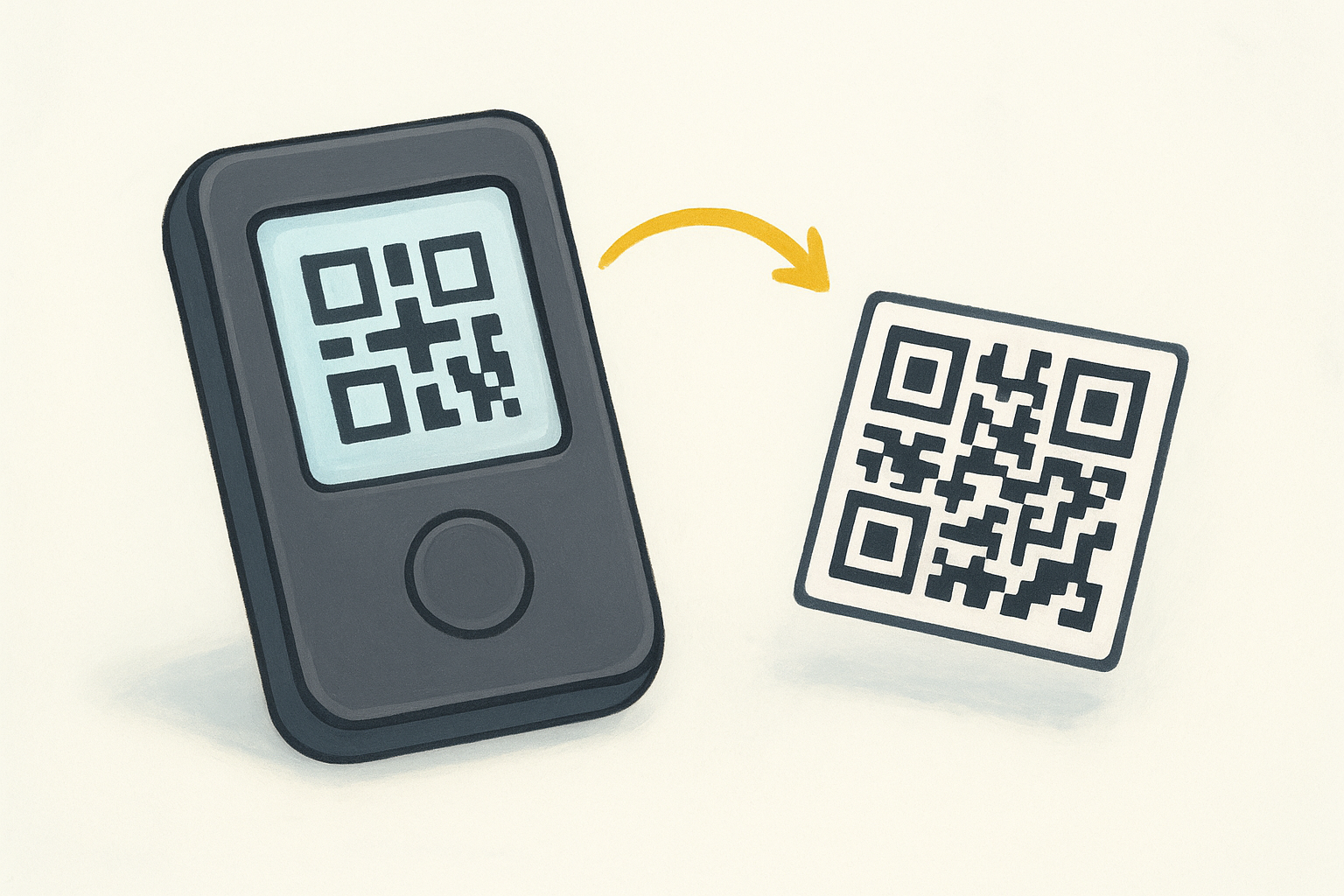
This architecture eliminates the USB and Bluetooth attack surface entirely. The tradeoff is that the scanning process adds extra steps to every transaction, which some users find cumbersome for regular use. For long-term holders who move funds infrequently, that friction is a minor issue compared to the added isolation. If you hold large balances and rarely transact, an air-gapped wallet gives you the strongest hardware-based security available without relying on any third-party infrastructure.
How to set up and use cold storage safely
Setting up a cold storage wallet correctly from the start determines how secure your funds remain long-term. Rushing through initial setup or skipping steps around seed phrase storage is where most people introduce preventable vulnerabilities. The process is straightforward, but each step requires deliberate attention because mistakes made here are difficult or impossible to reverse.
Getting your device and generating your seed phrase
Always buy your hardware wallet directly from the manufacturer's official website or a verified retailer, never from a third-party marketplace or private reseller. Tampered or pre-initialized devices are a real threat, and a device that arrives with a seed phrase already written inside has been compromised before you touched it. When you initialize your device, it generates your private key internally and displays your seed phrase on its own screen, completely offline.
Write your seed phrase on paper or a metal backup plate immediately during setup, in the exact order displayed. Store that backup in a physically secure location, separate from the device itself. Never photograph it, type it into any app, or store it digitally in any form. The seed phrase is your master recovery key, and exposing it to any internet-connected device defeats the entire purpose of cold storage.
If someone finds your seed phrase, they own your crypto, regardless of whether they ever touch your hardware device.
Moving funds and maintaining security over time
With cold storage wallet explained from a practical angle, the first fund transfer is the step most people get wrong. Before moving significant balances, send a small test amount first and verify you can receive it correctly. Always confirm the receiving address on your hardware wallet's screen directly, not just on your computer, because malware can silently replace clipboard addresses without any visible sign that something changed.
Ongoing security means keeping your device firmware updated through the manufacturer's official app only, and periodically verifying that your seed phrase backup is still intact and fully readable. Avoid updating firmware on public or shared networks. Treat every firmware update as a security-critical operation that deserves the same careful attention as your original setup.
Common risks, downsides, and mistakes to avoid
Cold storage wallet explained as a concept makes the security benefits clear, but self-custody also means all responsibility sits with you. There is no customer support line to call if you lose access. Understanding where things go wrong before they happen is the most practical thing you can do to protect your holdings long-term.
Losing access through seed phrase failure
The most common way people permanently lose their crypto is mismanaging their seed phrase, not hardware failure or hacking. If you store your seed phrase on a phone, in a cloud document, or in a photo roll, you have already created the vulnerability you were trying to eliminate. Digital storage of your seed phrase exposes it to the same online threats that cold storage is designed to block.
A cold storage device without a secured seed phrase backup is not cold storage. It is a single point of failure.
Physical storage also fails when people choose fragile or obvious locations. Paper degrades, floods happen, and fires destroy unprotected backups. A fireproof metal seed phrase plate stored in a separate location from your device gives your backup a realistic chance of surviving real-world disasters. Redundancy matters here the same way it matters in any security system.
Buying from unofficial sources and firmware traps
Purchasing a hardware wallet from a third-party reseller or secondhand marketplace introduces a risk that no firmware update can fix. A tampered device may have been initialized with a seed phrase the seller already recorded. By the time you transfer funds, the attacker is simply waiting. Always source your device directly from the manufacturer, full stop.
Firmware updates are another underestimated risk. Downloading updates from any source other than the manufacturer's official application opens the door to a compromised version that could expose your keys. Treat every update as security-critical and verify you are on the manufacturer's genuine platform before proceeding.
The cost of overconfidence after setup
Many people complete setup, move their funds, and then never verify their seed phrase backup again. Paper fades, ink smears, and storage locations get forgotten after years. A backup you cannot successfully read when you need it functions the same as no backup at all. Schedule a periodic check to confirm your seed phrase is intact, legible, and stored exactly where you expect it to be.
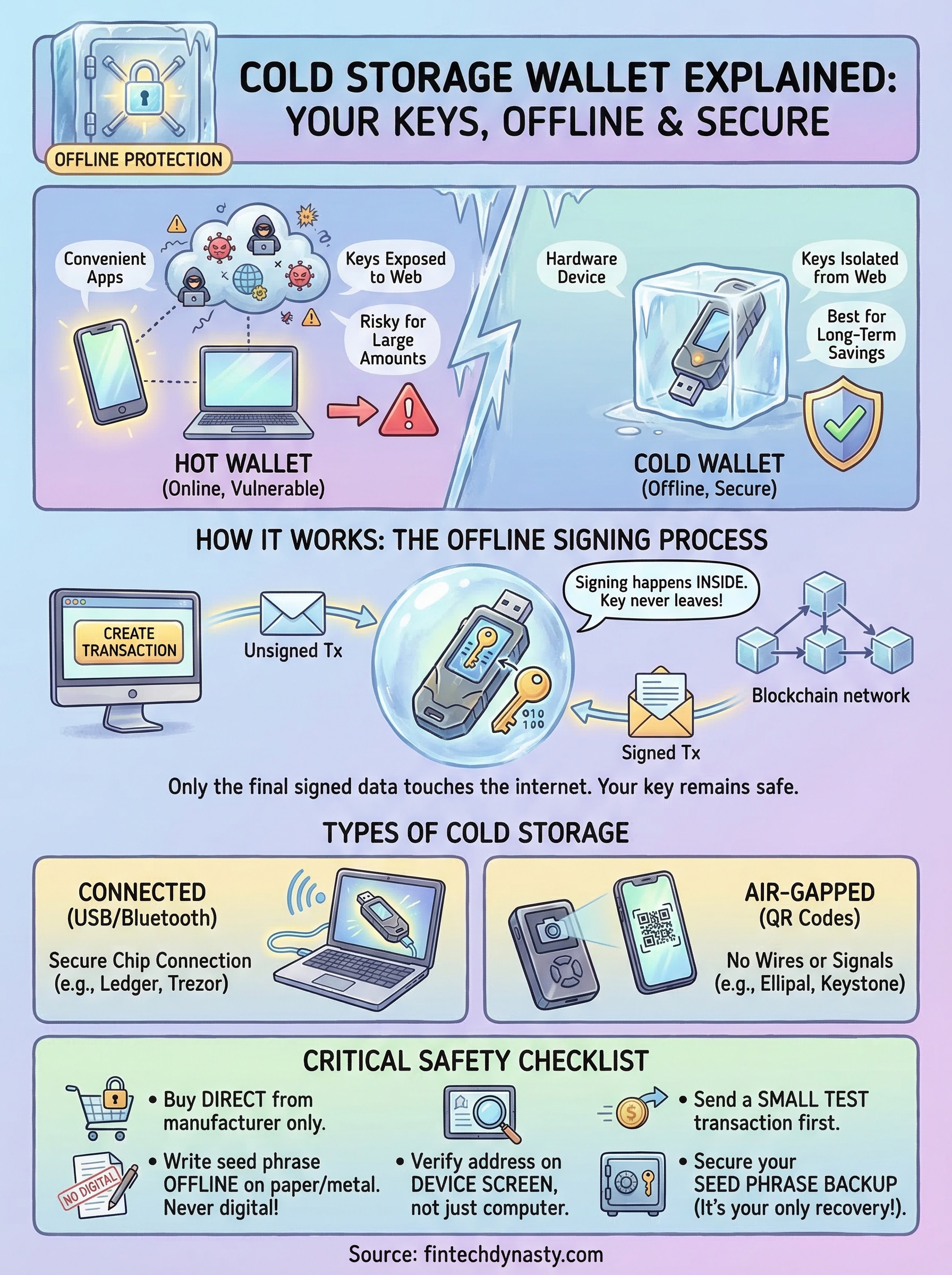
Final checklist
With cold storage wallet explained from every practical angle, here is what you need to action before moving any funds. This covers the essential steps that protect your assets long-term.
- Buy directly from the manufacturer's official website
- Generate your seed phrase on the device screen only, never online
- Write your seed phrase on paper or metal, never digitally
- Store the backup in a physically separate, secure location from the device
- Send a small test transaction before moving your full balance
- Verify the receiving address on your hardware wallet's screen, not your computer
- Update firmware only through the official manufacturer app
- Check your seed phrase backup periodically to confirm it is readable
Your security is only as strong as the weakest step in this process. If you want deeper comparisons of specific devices and step-by-step setup guides, visit FinTech Dynasty's hardware wallet resource hub to find the right cold storage solution for your situation.