

8 Best Patch Management Software For Small Business (2026)
Unpatched software is one of the easiest ways attackers break into small business networks. At FinTech Dynasty, we cover digital security from every angle, and whether you're protecting crypto wallets or company endpoints, the principle is the same: close your vulnerabilities before someone exploits them. That's exactly why patch management software for small business operations deserves serious attention, not an afterthought.
The problem is straightforward. Small businesses run dozens of applications across multiple machines, and manually tracking updates for each one is unrealistic. Missed patches lead to known exploits, and known exploits are the low-hanging fruit that ransomware operators and data thieves target first. You don't need a six-figure IT budget to fix this, but you do need the right tool doing the work for you.
This guide breaks down eight patch management platforms built for small business teams and budgets. We compared them on automation capabilities, ease of setup, OS and third-party app coverage, and cost. Each pick solves a specific pain point, so whether you need something dead simple or a tool with deeper endpoint control, you'll find a match below.
1. Action1
Action1 is a cloud-based patch management platform that stands out immediately because of its genuinely functional free tier. You don't need on-premise infrastructure, and the entire management interface runs through a web browser. Getting your first endpoints enrolled typically takes under 30 minutes, which matters when you have no dedicated IT staff and limited setup time.
What it patches and how it deploys
Action1 covers Windows OS updates as well as a library of third-party applications. Deployment works through a lightweight agent you install on each endpoint, and that agent communicates directly with Action1's cloud servers to receive and apply patches. No VPN or on-premise server is required, so remote and office-based machines are managed exactly the same way.
Supported third-party applications include:
- Google Chrome and Mozilla Firefox
- Zoom, Slack, and 7-Zip
- Adobe Acrobat Reader and VLC Media Player
Automation and reporting
Action1 lets you build automated patching policies that run on a schedule you define, with options to exclude certain patch categories or defer updates until after testing. The reporting dashboard shows you which endpoints are compliant, which are missing critical patches, and what was deployed and when. Audit logs are stored and exportable, which helps if you ever need to demonstrate compliance to a client or insurer.
Action1's automated scheduling combined with its real-time compliance dashboard removes the need for manual patch tracking, which is one of the most practical advantages available in patch management software for small business teams.
Best fit for small businesses
Action1 works best for businesses running 5 to 200 Windows endpoints that need solid patch coverage without upfront infrastructure costs. If your team is distributed across multiple locations, the cloud-native architecture handles remote machines without added networking complexity. Mixed on-site and remote environments are fully supported from day one.
Pricing and licensing
Action1 is free for up to 200 endpoints, which covers most small businesses outright. Beyond that threshold, paid plans start at approximately $2.50 per endpoint per month. No long-term contracts are required at the base tier, and the free plan includes core patching and automation features, not a stripped-down trial.
2. NinjaOne
NinjaOne is a unified IT management platform that combines patch management with remote monitoring, device management, and endpoint security in a single dashboard. For small businesses that want more than just patching without juggling multiple disconnected tools, this consolidation reduces overhead and simplifies daily IT work.
What it patches and how it deploys
NinjaOne covers Windows, macOS, and Linux endpoints, along with a solid library of third-party applications. Deployment uses a lightweight agent installed on each device, which pulls and applies patches based on policies you configure in the cloud console. No on-premise server is required, and new devices enroll quickly through a simple installer.
Automation and reporting
The platform lets you schedule automated patch cycles, set maintenance windows, and configure approval workflows before patches reach production machines. Reporting gives you a clear view of patch status across all endpoints, with filters by device, OS, or vulnerability severity. Compliance summaries are exportable, which helps when you need to report to stakeholders or satisfy basic security audits.
For small businesses that need patch management software for small business environments alongside remote monitoring and helpdesk tools, NinjaOne's all-in-one approach reduces the number of vendor contracts you manage.
Best fit for small businesses
Small businesses running 10 to 500 endpoints that want IT management consolidated under one roof will get the most from NinjaOne. It works especially well if you outsource IT to a managed service provider, since many MSPs already run NinjaOne as their primary platform.
Pricing and licensing
Pricing is per device per month, and you request a custom quote directly through their website. There is no permanent free tier, but a free trial is available so you can test the platform before committing to a contract.
3. ManageEngine Patch Manager Plus
ManageEngine Patch Manager Plus is a dedicated patch management solution from Zoho's IT management division. It gives you centralized control over patching across multiple operating systems and a large catalog of third-party applications, making it a strong option when breadth of coverage matters as much as automation.
What it patches and how it deploys
Patch Manager Plus covers Windows, macOS, and Linux endpoints, along with over 850 third-party applications. You deploy a lightweight agent to each machine, and that agent communicates with a central server, either hosted on-premise or through their cloud option. Both deployment models are supported, so you can choose what fits your infrastructure without being forced into one architecture.
Automation and reporting
The platform lets you automate patch deployment on a schedule, define test groups before rolling patches to all machines, and set up approval workflows to prevent untested updates from going live too fast. Reports give you a clear view of missing patches, deployment success rates, and overall endpoint compliance. Detailed audit trails are built in, which is useful if you need documentation for insurance or compliance purposes.
For teams evaluating patch management software for small business environments, Patch Manager Plus's multi-OS coverage and granular automation controls put it ahead of simpler single-platform tools.
Best fit for small businesses
This tool works well for businesses running mixed OS environments where Windows-only tools fall short. If your team uses a combination of Windows and macOS devices, the unified coverage removes the need for separate patching workflows.
Pricing and licensing
Patch Manager Plus is free for up to 25 devices, which works for very small teams. Paid plans scale by endpoint count, starting at around $245 per year for 50 devices on the cloud version.
4. Automox
Automox is a cloud-native patch management platform built specifically for distributed teams. It handles endpoint patching without requiring any on-premise infrastructure, and its policy-based system makes it straightforward to manage even if you have no dedicated IT staff on your payroll.
What it patches and how it deploys
Automox covers Windows, macOS, and Linux endpoints through a single unified console, which immediately separates it from tools that handle only one operating system. You install a small agent on each device, and that agent pulls patch instructions from Automox's cloud servers. Remote and office-based machines are treated identically, so your setup doesn't change as your team grows or shifts locations.
Automation and reporting
The platform uses policy-driven automation to apply patches on schedules you define, with options to set maintenance windows that avoid disrupting working hours. Reports break down patch status by device, operating system, and severity level, giving you a quick view of where your exposure sits. Exportable compliance reports are included, which is useful when you need to show a client or insurer that your endpoints are actively maintained.
For businesses evaluating patch management software for small business use, Automox's cross-platform coverage from a single cloud console removes the friction of managing separate tools for each operating system.
Best fit for small businesses
Automox fits teams running mixed OS environments with remote or hybrid workforces. If your staff uses both Windows and macOS devices across multiple locations, the unified cloud console keeps everything visible and manageable from one place.
Pricing and licensing
Automox pricing starts at $3 per device per month on the base plan. There is no permanent free tier, but a free trial is available to test coverage and automation before you commit.
5. Microsoft Intune and Windows Update for Business
Microsoft Intune paired with Windows Update for Business gives you a built-in patching solution that lives inside the Microsoft 365 ecosystem. If your business already pays for Microsoft 365 Business Premium, you likely have access to both tools without adding another vendor to your stack.
What it patches and how it deploys
Intune focuses on Windows and macOS endpoints, with additional support for iOS and Android mobile devices. Windows Update for Business handles the Windows OS update side directly through Microsoft's infrastructure, while Intune layers in policy control and mobile device management. Deployment runs without a separate on-premise server, using Microsoft's cloud infrastructure to push configurations to enrolled devices.
Automation and reporting
Intune lets you define update rings, which are groups of devices that receive patches at different stages, so you can test updates on a small group before rolling them out company-wide. Reporting shows device compliance status, pending updates, and deployment success across your fleet. Integration with Microsoft Endpoint Analytics gives you additional visibility into device health trends over time.
For businesses already running Microsoft 365, this combination is one of the most cost-effective approaches to patch management software for small business environments because no additional licensing may be required.
Best fit for small businesses
This pairing works best for Windows-first businesses already inside the Microsoft 365 ecosystem. If your team runs primarily Windows devices and you want minimal vendor sprawl, the native integration removes a significant amount of complexity.
Pricing and licensing
Microsoft Intune is included with Microsoft 365 Business Premium, which starts at $22 per user per month. Standalone Intune licensing starts at $8 per user per month if you need it outside a bundled plan.
6. Atera
Atera is an all-in-one IT management platform built for IT professionals and managed service providers who support small businesses. It packages remote monitoring, helpdesk, and patch management into a single subscription, keeping your toolset lean and your monthly costs predictable.
What it patches and how it deploys
The platform covers Windows and macOS endpoints through a lightweight agent installed on each device. That agent connects to Atera's cloud infrastructure and applies patches based on profiles you assign to each device group. No on-premise server is required, so remote and in-office machines are managed from the same console without any networking workarounds.
Automation and reporting
Scheduling automated patch deployments during off-hours keeps your team's workday uninterrupted. You can configure patch profiles for different device groups, controlling which updates go where and exactly when they apply. Compliance reports give you a clear view of patch status across every enrolled endpoint without having to pull data manually.
For small businesses evaluating patch management software for small business use, Atera's bundled model means you are not paying separately for remote monitoring, ticketing, and patching.
Best fit for small businesses
Atera works best for businesses with 1 to 5 internal IT staff or for teams that work closely with an MSP. If you want a single platform that covers IT management end to end, the consolidated toolset reduces vendor relationships and cuts down on the overhead of juggling multiple logins and billing cycles.
Pricing and licensing
Per-technician pricing is Atera's standout cost structure, with plans starting at $149 per technician per month and unlimited devices included at every tier, which keeps costs predictable regardless of how many endpoints you manage.
7. Heimdal Patch and Asset Management
Heimdal Patch and Asset Management is a security-focused patching tool from a European cybersecurity vendor. Unlike general IT management platforms, Heimdal builds patching directly into a broader security stack, which means your patch deployments happen alongside threat detection rather than as a separate workflow.
What it patches and how it deploys
Heimdal covers Windows OS and a wide range of third-party applications, including browsers, productivity tools, and common business software. Deployment uses a lightweight agent installed on each endpoint, with patches delivered silently in the background. No end-user interaction is required, so your team keeps working while updates apply without interruption.
Automation and reporting
The platform lets you schedule fully automated patch cycles and define deployment rules by device group or software category. Reporting shows patch status across your entire fleet, with visibility into which machines are missing critical updates and when each patch was last applied. Compliance reports are exportable, giving you documentation you can use for security audits or insurance requirements.
For teams evaluating patch management software for small business environments with a security-first priority, Heimdal's integrated approach connects patching directly to its broader threat intelligence layer.
Best fit for small businesses
Heimdal fits security-conscious small businesses that want patching bundled with endpoint protection rather than managed through a separate vendor. If you already use or plan to use Heimdal's security suite, adding patch management at the same layer reduces complexity significantly.
Pricing and licensing
Pricing is available on request through Heimdal's website, with custom quotes based on endpoint count and which modules you bundle together.
8. GFI LanGuard
GFI LanGuard is a network security scanner and patch management tool that has built a track record with small and mid-sized businesses over many years. It combines vulnerability scanning with patch deployment in one interface, so you get both exposure detection and remediation without switching between separate tools.
What it patches and how it deploys
Coverage spans Windows, macOS, and Linux endpoints, along with third-party application patching for commonly used software. Deployment works through an agent installed on each machine or via agentless scanning, giving you flexibility based on how your network is structured. Over 4,000 patches are supported across Microsoft and third-party products.
Automation and reporting
The platform lets you schedule automated patch deployment cycles and set up approval rules to control what gets pushed to production machines without manual intervention. Reports give you a detailed breakdown of missing patches, vulnerability scan results, and remediation history. Exportable compliance reports help you document your security posture for audits or insurance reviews.
For businesses comparing patch management software for small business environments that also want built-in vulnerability scanning, GFI LanGuard combines both functions in a single product.
Best fit for small businesses
This tool suits businesses that want vulnerability assessment bundled with patching rather than purchasing two separate tools. If your team needs to identify exposures and fix them from the same console, the dual-function setup saves both time and budget.
Pricing and licensing
Pricing starts at $35 per device per year on an annual subscription, with volume discounts available as your endpoint count increases. A free trial is available through GFI's website so you can evaluate coverage before committing.
Quick recap
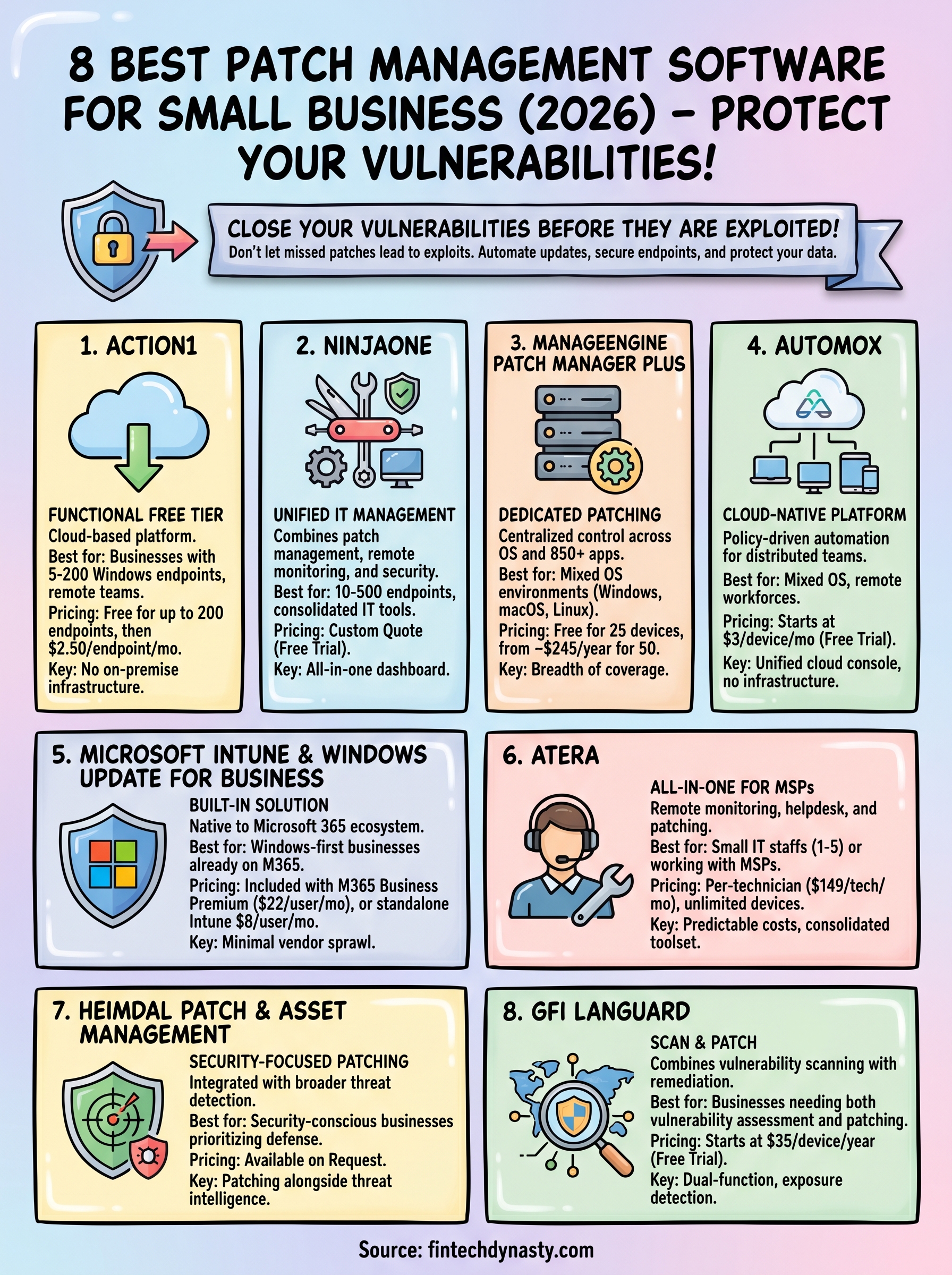
Eight tools, eight different ways to solve the same core problem. Action1 gives you the most accessible entry point with its free tier covering up to 200 endpoints. NinjaOne and Atera work best when you want patching bundled with broader IT management under one roof. Automox and ManageEngine handle mixed OS environments well, while Microsoft Intune fits businesses already running Microsoft 365 without adding another vendor.
Choosing the right patch management software for small business comes down to your endpoint count, the operating systems you run, and how much automation you need from day one. GFI LanGuard adds vulnerability scanning to the mix, and Heimdal connects patching directly to a security-first stack if endpoint protection is your priority.
Your next step after locking down your endpoints is building a stronger understanding of digital asset security at every layer. If you want structured, practical guidance on protecting your assets, start with the FinTech Dynasty crypto education course.