

Google Android Security Bulletin: What It Is & Why It Counts
Every month, Google publishes a document called the Google Android Security Bulletin, a detailed list of security vulnerabilities discovered in the Android operating system, along with the patches designed to fix them. If you use an Android phone to manage crypto wallets, access exchange accounts, or store authentication apps, this bulletin directly affects you.
Most people never read it. That's a problem, because Android vulnerabilities are one of the most common attack surfaces for stealing digital assets. A single unpatched flaw in your phone's firmware or Bluetooth stack can give an attacker a path to your private keys, seed phrases, or two-factor authentication codes. At FinTech Dynasty, we focus on crypto security from every angle, and your mobile device's patch status is part of that equation, whether you're running a hot wallet on your phone or simply using it alongside a hardware wallet for transaction signing.
This article breaks down what the Android Security Bulletin actually contains, how to read it, why the monthly patch level on your device matters, and what steps you should take to keep your phone from becoming the weakest link in your self-custody setup.
Why the Android Security Bulletin matters
Most people think of phone security as something that handles itself. Android updates arrive, you tap "Install later" a few times, and eventually the notification disappears. But your phone carries a significant amount of sensitive access: exchange logins, authentication apps, wallet interfaces, and in many cases, screenshots or notes tied to seed phrases. The monthly bulletin is the clearest signal you have that vulnerabilities in that device are being actively identified and patched.
Your phone is part of your security stack
If you use a hardware wallet, you may feel confident that your private keys are stored offline. That confidence is well-placed, but it does not cover everything. When you connect your hardware wallet to an Android phone to sign a transaction, the phone's operating system is part of that communication path. A compromised Android device can intercept what you are signing, alter destination addresses, or silently log your screen inputs before the request ever reaches your hardware device. The Google Android Security Bulletin documents exactly the kinds of flaws that make that attack possible, including vulnerabilities in Bluetooth stacks, USB handling, and the media framework.
A hardware wallet protects your private keys, but a compromised phone can still manipulate what you're asked to sign before the request reaches the device.
Your phone also manages two-factor authentication codes, which are the primary protection layer on most exchange accounts and custodial wallets. A vulnerability in Android's permission model or in how it processes NFC signals can give a malicious app or a nearby attacker access to those codes without any visible indication. Treating your phone as a genuinely secure device means staying informed about what Google flags and patches each month, not just assuming the hardware wallet handles everything.
The real cost of ignoring patch status
Attackers do not wait for mainstream coverage to exploit a known vulnerability. Once a patch lands in the bulletin, the technical details of the underlying flaw become public, which gives attackers a working blueprint to target devices that have not yet received the update. For cryptocurrency holders, that window between bulletin publication and the moment your device installs the patch represents a measurable period of elevated and documented risk.
Older Android devices often stop receiving security updates entirely after two to four years of support. If your phone runs a patch level from 2022 or earlier, it likely contains dozens of unaddressed vulnerabilities that Google has already documented and resolved on supported hardware. Regularly checking your patch level and understanding what the bulletin covers gives you the information you need to decide whether your current device is still appropriate for any crypto-related task, from signing transactions to logging into exchange accounts.
What the bulletin contains and how to read it
The Google Android Security Bulletin is a structured technical document, not a summary or opinion piece. Each monthly entry lists a CVE identifier (a standardized code assigned to a specific flaw), the affected Android component, a severity rating, and the minimum patch level required to fix the issue. Reading it means understanding how those four elements connect, and what they tell you about your device's current exposure.
The patch level structure
Google organizes each bulletin around two patch level dates, typically the first and fifth of the month. A device carrying the first-of-month patch level has received fixes for core Android platform and framework vulnerabilities. A device carrying the fifth-of-month patch level has also received chipset-level and vendor-specific fixes, including driver patches from manufacturers like Qualcomm or MediaTek. Here is what each level covers:
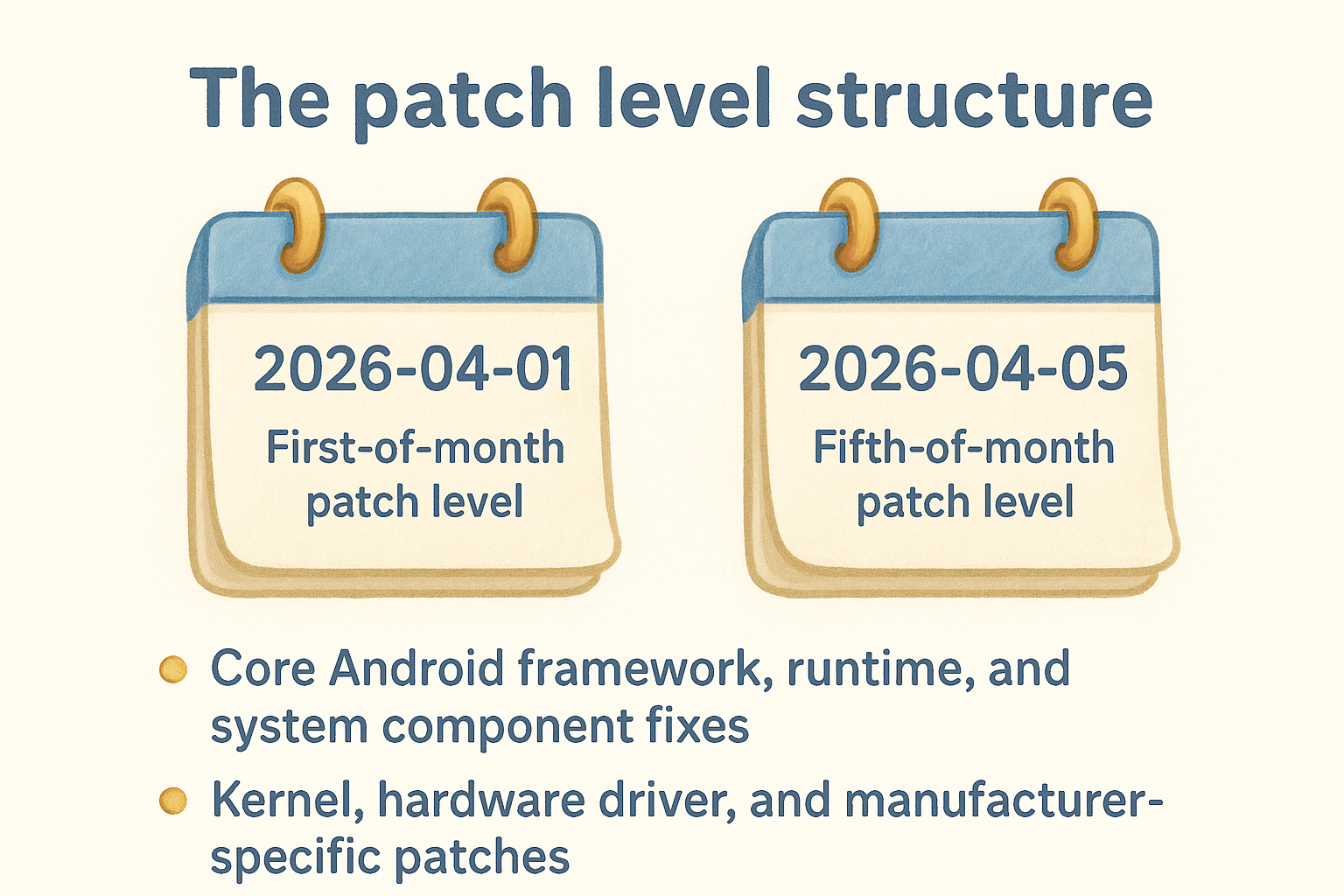
- First-of-month patch level (e.g., 2026-04-01): Core Android framework, runtime, and system component fixes
- Fifth-of-month patch level (e.g., 2026-04-05): All of the above, plus kernel, hardware driver, and manufacturer-specific patches
The fifth-of-month patch level delivers more complete protection and is the one worth targeting when verifying your device's status.
Understanding severity ratings
Google assigns each CVE one of four labels: Critical, High, Moderate, or Low. Critical vulnerabilities are the most urgent because they allow remote code execution without any user interaction, meaning an attacker can take control of your device without you tapping a link or opening a file. High-severity flaws typically require some local access or user interaction but still create serious exposure through privilege escalation or unauthorized data access.
When you scan a bulletin, focus on Critical and High entries first. Those represent confirmed, documented vulnerabilities that unpatched devices are currently exposed to in the open. Moderate and Low entries are real flaws but require more specific conditions to exploit, and they rarely serve as the primary attack vector against a crypto user's device.
How to check your Android security patch level
Finding your patch level takes under a minute, and it gives you the specific date string you need to compare against the current google android security bulletin. That date appears in your device settings formatted like 2026-04-05, and it tells you exactly which documented fixes are installed on your phone right now.
Where to find the setting
The path varies slightly by manufacturer, but on most Android devices you reach the patch level through Settings > About phone > Android security patch level. On Samsung devices, look under Settings > About phone > Software information, where the patch level appears as a separate labeled field below the Android version. Google Pixel phones display it directly under Settings > About phone, typically within the first few visible lines on that screen.
Once you locate the date, compare it against the most recent bulletin at source.android.com/docs/security/bulletin to see exactly which vulnerabilities your device has and has not addressed.
What the date string actually tells you
Your patch level date is not a release date or a warranty marker. It is a security commitment threshold, meaning your device has received every fix documented in Google's bulletins up to and including that exact date. If your date reads 2025-09-01, your phone is missing at least seven months of documented patches, including everything Google flagged as Critical or High in that period.
Checking this number every couple of months is a straightforward habit worth building, especially if you use your phone to access exchange accounts, authentication apps, or any wallet interface. A gap of more than 90 days between your current patch level and today's date is a clear signal that your device's security profile is operating with confirmed, documented gaps. For anyone using their phone alongside a hardware wallet or self-custody setup, that gap deserves a direct response before the next transaction.
How patches reach your phone and why timing varies
Google publishes the google android security bulletin on a fixed monthly schedule, but that publication date does not mean every Android device receives the fixes at the same time. The path from Google's bulletin to your phone runs through multiple layers of manufacturers and carriers, each of which introduces its own testing and approval timeline before anything lands on your device.
From Google to your device: the distribution chain
Google pushes patches directly to Pixel devices first, which is why those phones typically carry the most current patch level within days of a bulletin's release. For every other Android manufacturer, the process is different. Companies like Samsung, OnePlus, and Motorola receive Google's core patch code and then integrate it into their own software builds, which include custom firmware layers, pre-installed apps, and hardware driver adjustments specific to their devices. That integration requires internal testing cycles that can add weeks to the delivery timeline.
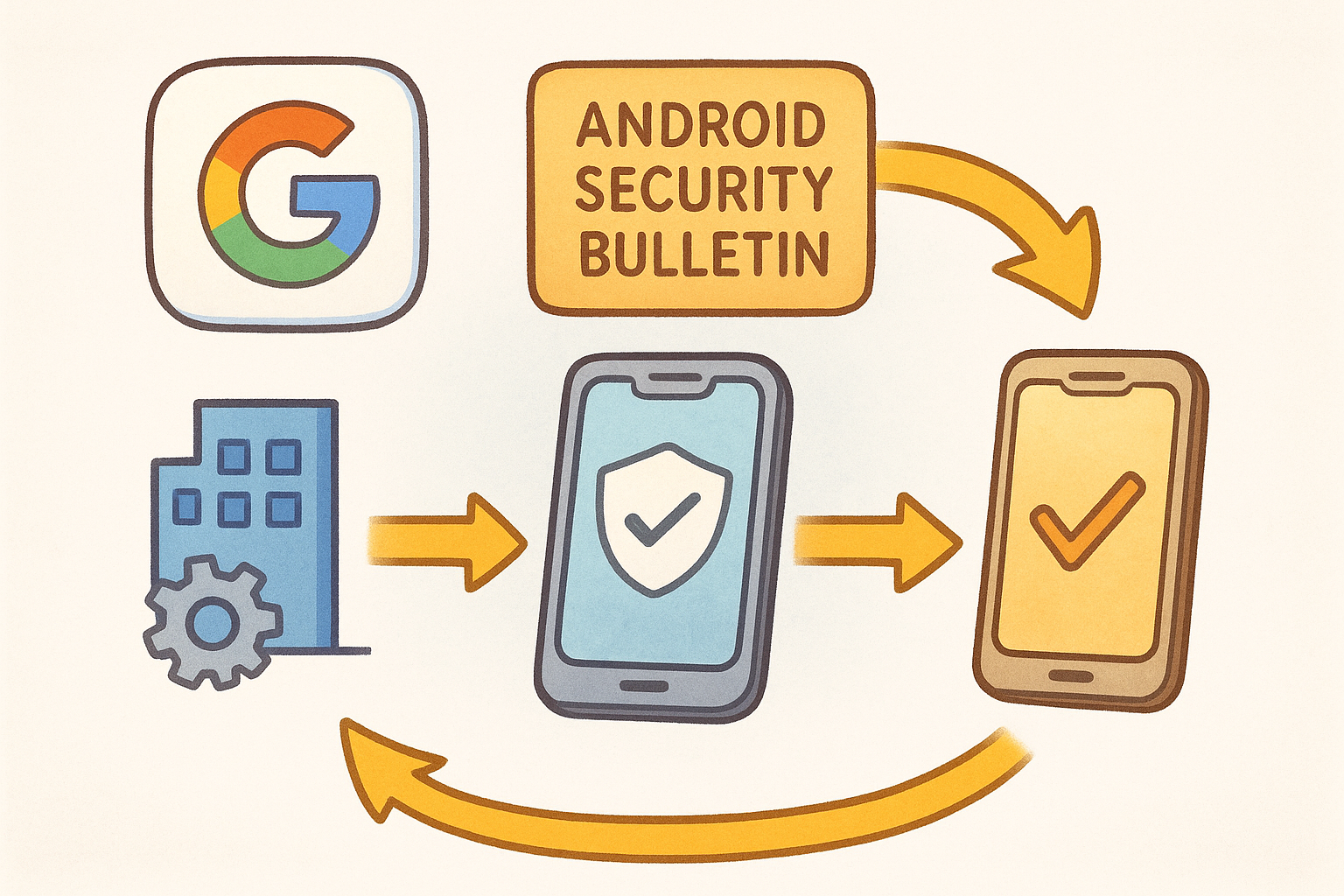
Pixel phones receive patches fastest because Google controls both the software and the hardware. Every other manufacturer adds its own layer to that process.
If your device is sold through a carrier like Verizon or AT&T, that carrier often runs its own testing and approval phase on top of the manufacturer's. Carriers check that patched firmware does not break their specific network configurations or pre-installed apps, which adds another potential delay before the update reaches your phone.
Why some phones lag behind others
Budget and mid-range Android devices tend to receive patches later and for shorter periods than flagship models from the same manufacturer. Most manufacturers commit to a defined number of years of security updates, and lower-cost devices often fall at the shorter end of that range. Once your device exits its official support window, monthly patches stop arriving entirely, regardless of what Google continues to document and fix.
Knowing your manufacturer's update policy and your device's end-of-support date gives you a realistic picture of how long your current phone remains a viable tool for any security-sensitive task.
Common questions and pitfalls about bulletins
A few misconceptions about the google android security bulletin lead people to assume they are protected when they are not. Understanding where those assumptions break down helps you make more accurate decisions about your device's actual security posture.
Does having the latest Android version mean you are fully patched?
No, and this is one of the most common mistakes crypto users make. Android version numbers (like Android 14 or Android 15) track feature releases, not security patches. A device can run the latest Android version while carrying a patch level that is three or four months behind the current bulletin. The two numbers are tracked separately, and the version number tells you nothing about which documented vulnerabilities your device has actually addressed.
Check your security patch level specifically, not just your Android version, to know where your device stands against current threats.
Your patch level is the only number that maps directly to the bulletin's CVE list, which means it is the only number worth checking when you want to assess real security exposure.
Will installing a VPN or security app replace missing patches?
Third-party security apps and VPNs provide useful additional layers, but they cannot fill the gaps that missing system patches leave behind. A VPN encrypts your network traffic but does nothing to address a kernel-level vulnerability that lets a malicious app escalate privileges on your device. Security apps operate on top of the operating system, which means any flaw deep enough in Android's core to require a system patch sits outside the scope of what those tools can reach.
Relying on them as a substitute for up-to-date patches creates a false sense of protection that leaves your device genuinely exposed at the system level. For anyone using their phone alongside self-custody tools or exchange accounts, that exposure is a concrete and documented risk, not a theoretical one.
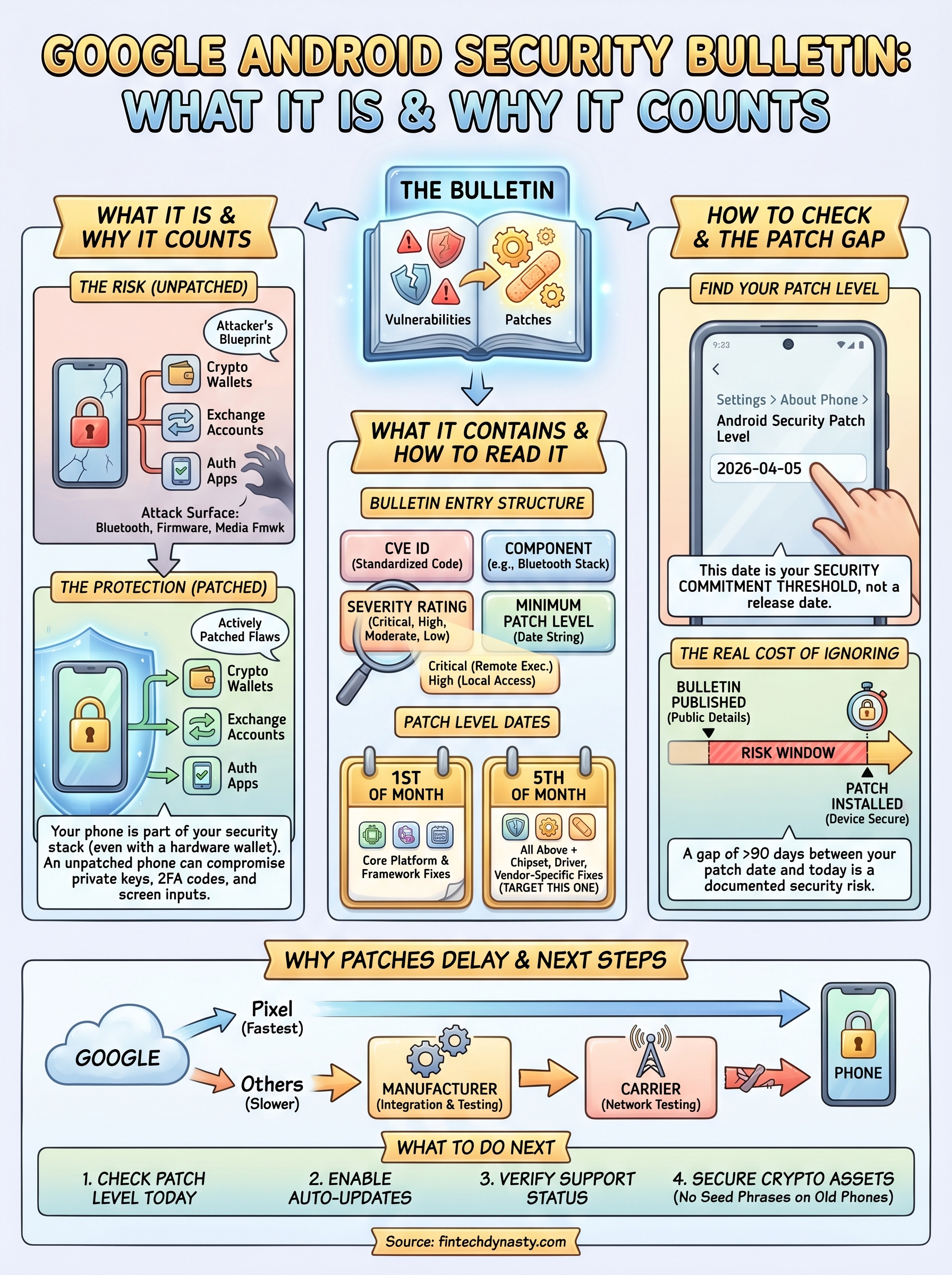
What to do next
Start by checking your Android security patch level today. Go to your device settings, find your patch date, and compare it against the current google android security bulletin at source.android.com. If your patch level is more than 90 days behind, treat that as a priority, not a background task. Enable automatic system updates, check your manufacturer's support page to confirm your device still receives patches, and stop storing seed phrases or authentication codes on any phone running an unsupported Android version.
Your phone is one piece of a broader security setup, and understanding how it connects to your self-custody strategy takes more than a single article. If you want structured, practical guidance on protecting your digital assets from the device level up, the FinTech Dynasty crypto security course covers wallet security, self-custody fundamentals, and real-world threat prevention in a format built for people who want clarity without the noise.