

Two Factor Authentication Definition: 2FA Explained Clearly
A single password stands between your accounts and anyone trying to break in. That's a problem. Passwords get leaked, guessed, and stolen every day. Understanding the two factor authentication definition is the first step toward adding a critical layer of protection to your digital life, and it's especially important when cryptocurrency and financial accounts are on the line.
Two-factor authentication (2FA) requires you to prove your identity using two separate verification methods before gaining access. This simple concept has become one of the most effective defenses against unauthorized access, yet many people either skip it or don't fully understand how it works. At FinTech Dynasty, we focus on helping you protect your digital assets through education and practical security measures, and 2FA sits at the foundation of that effort.
This guide breaks down exactly what 2FA is, how the different authentication factors function, and why enabling it matters for safeguarding your accounts, whether you're securing an email inbox or a hardware wallet holding Bitcoin.
Why two-factor authentication matters
Your password alone provides minimal protection. Hackers deploy automated tools that test millions of password combinations per second, and data breaches expose billions of login credentials annually across the internet. Understanding the two factor authentication definition becomes critical when you realize that a single compromised password can grant complete access to your email, bank account, or cryptocurrency wallet without any additional barriers.
Passwords alone are not enough
Most people reuse passwords across multiple accounts, and attackers know this. When one service suffers a breach, criminals immediately test those stolen credentials on banking sites, email providers, and cryptocurrency exchanges. Your password might be strong, but if you used it elsewhere and that other site got hacked, your security collapsed at someone else's weak point.
Data breaches have exposed over 15 billion credentials in the past decade alone, creating massive databases that attackers use for credential stuffing attacks. These automated attacks try your email and password combination across hundreds of platforms simultaneously. Even if you create unique passwords, phishing attacks trick users into handing over login details directly to fake websites that look identical to legitimate services.
Without a second verification layer, a single stolen password grants full access to everything you own online.
Real-world consequences of weak security
Cryptocurrency theft provides the clearest example of what happens when accounts lack proper protection. Once attackers access an exchange account with only a password, they transfer funds instantly to wallets you cannot trace or recover. Traditional financial institutions may reverse fraudulent transactions, but blockchain transactions are permanent and irreversible by design.
Email account takeovers create cascading failures across your digital life. Attackers who breach your email can reset passwords for every service linked to that address, including your bank, investment accounts, and social media profiles. They lock you out while systematically draining connected financial accounts and impersonating you to scam your contacts.
How 2FA stops most attacks
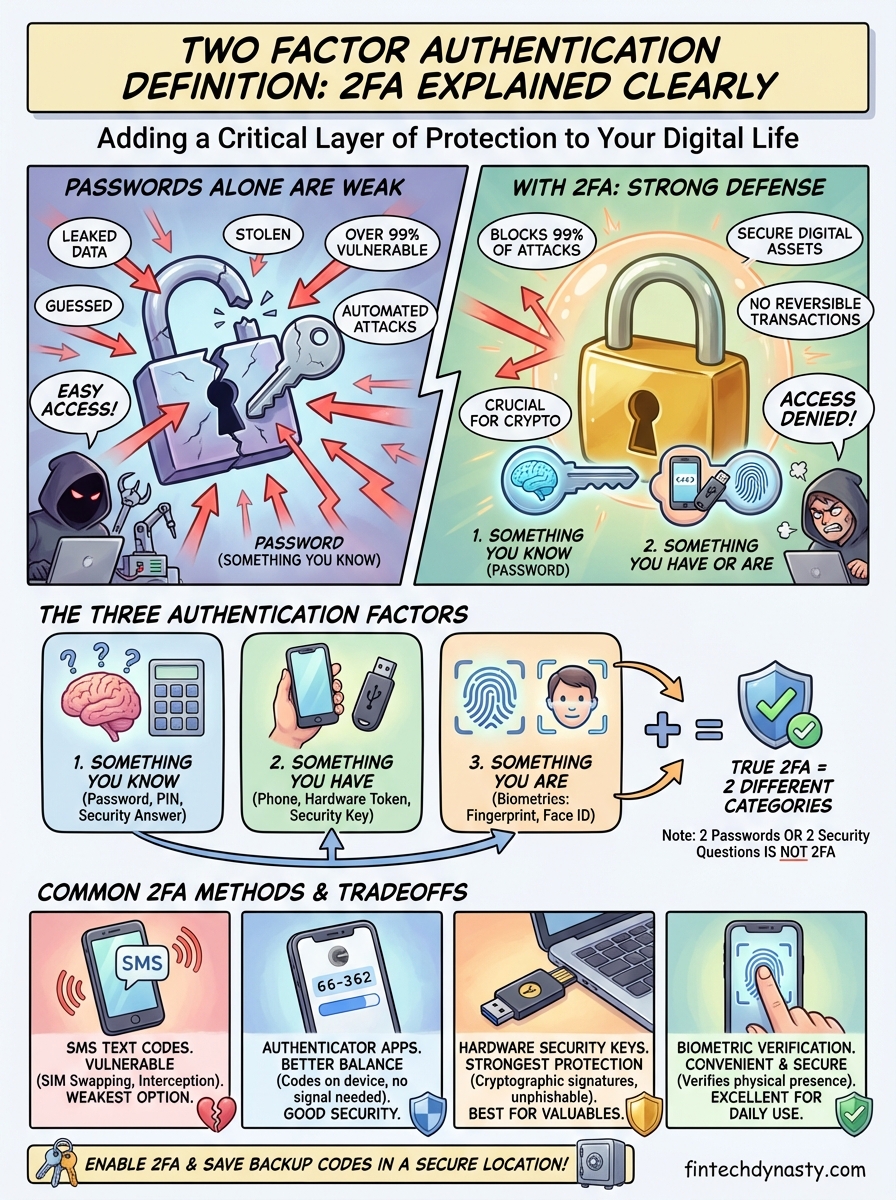
Two-factor authentication blocks attackers even when they possess your correct password. The system requires proof from something you have (like your phone) or something you are (like your fingerprint) in addition to something you know (your password). Attackers sitting thousands of miles away with your stolen credentials cannot access your physical device or biometric data.
Studies show that enabling 2FA prevents over 99% of automated attacks targeting accounts. Criminals focus their efforts on the easiest targets, and accounts protected by two factors simply require too much effort compared to the millions of accounts that rely on passwords alone. You remove yourself from the pool of easy victims by adding this single security measure.
The protection becomes especially valuable for cryptocurrency holders who cannot reverse transactions or call customer support to undo theft. Your private keys and exchange accounts represent direct access to funds with no safety net, making two-factor authentication not just recommended but essential for anyone holding digital assets worth protecting.
What counts as 2FA and what does not
The two factor authentication definition requires two distinct verification methods from separate categories of proof. You cannot simply use two passwords or answer two security questions and call it 2FA. Authentic two-factor systems demand proof from different authentication categories, and understanding this distinction prevents you from believing you're protected when you're actually vulnerable.
Authentication factors explained
Security experts recognize three primary authentication factors that systems can use to verify your identity. The first factor covers something you know, like a password, PIN, or the answer to a security question. Your second factor must come from a completely different category to qualify as genuine 2FA.
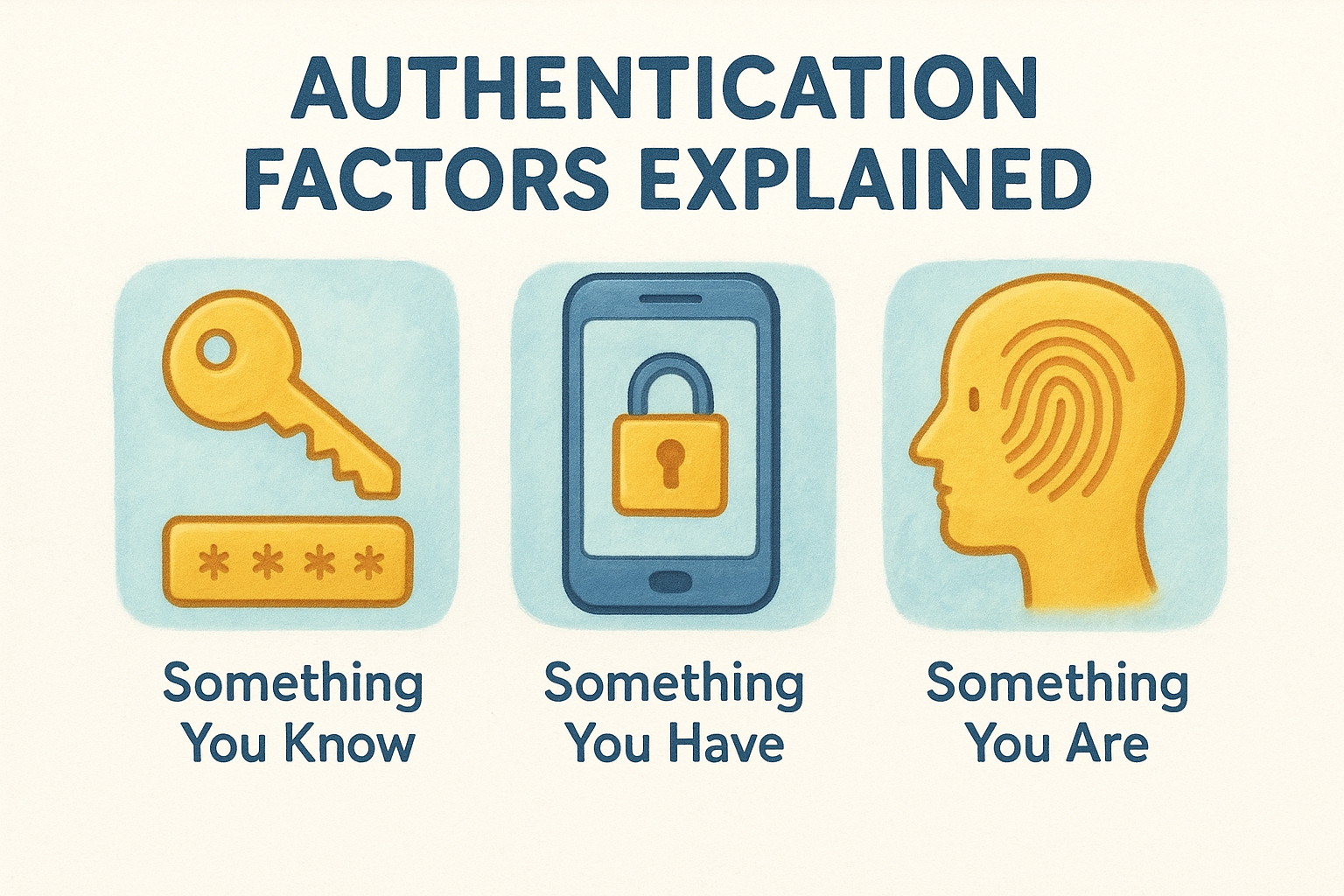
Something you have represents the second factor category and includes physical devices like your smartphone, a security key, or a hardware token that generates time-based codes. The third factor covers something you are, which means biometric data such as your fingerprint, facial recognition, or iris scan. True two-factor authentication pulls one element from the "something you know" category and another from either "something you have" or "something you are."
Combining two elements from the same category does not create two-factor authentication, no matter how complex each element appears.
Common mistakes that aren't 2FA
Many websites claim to offer enhanced security but actually provide single-factor authentication with extra steps. Using a password followed by a security question fails the test because both verification methods come from the "something you know" category. Attackers who research your personal information can often guess or discover answers to common security questions about your mother's maiden name, your first pet, or where you met your spouse.
Email-based verification codes present another misleading security measure that many people confuse with 2FA. If a service sends a code to your email address during login, you're still using single-factor authentication because accessing that code only requires your email password (something you know). The system has not verified possession of a separate physical device or requested biometric confirmation.
Password reset links sent to your email create the same vulnerability. Attackers who compromise your email account bypass the entire verification system because they control the single point of failure protecting all linked accounts. Real 2FA requires proof that cannot be defeated by gaining access to just one other account or piece of information about your life.
How 2FA works step by step
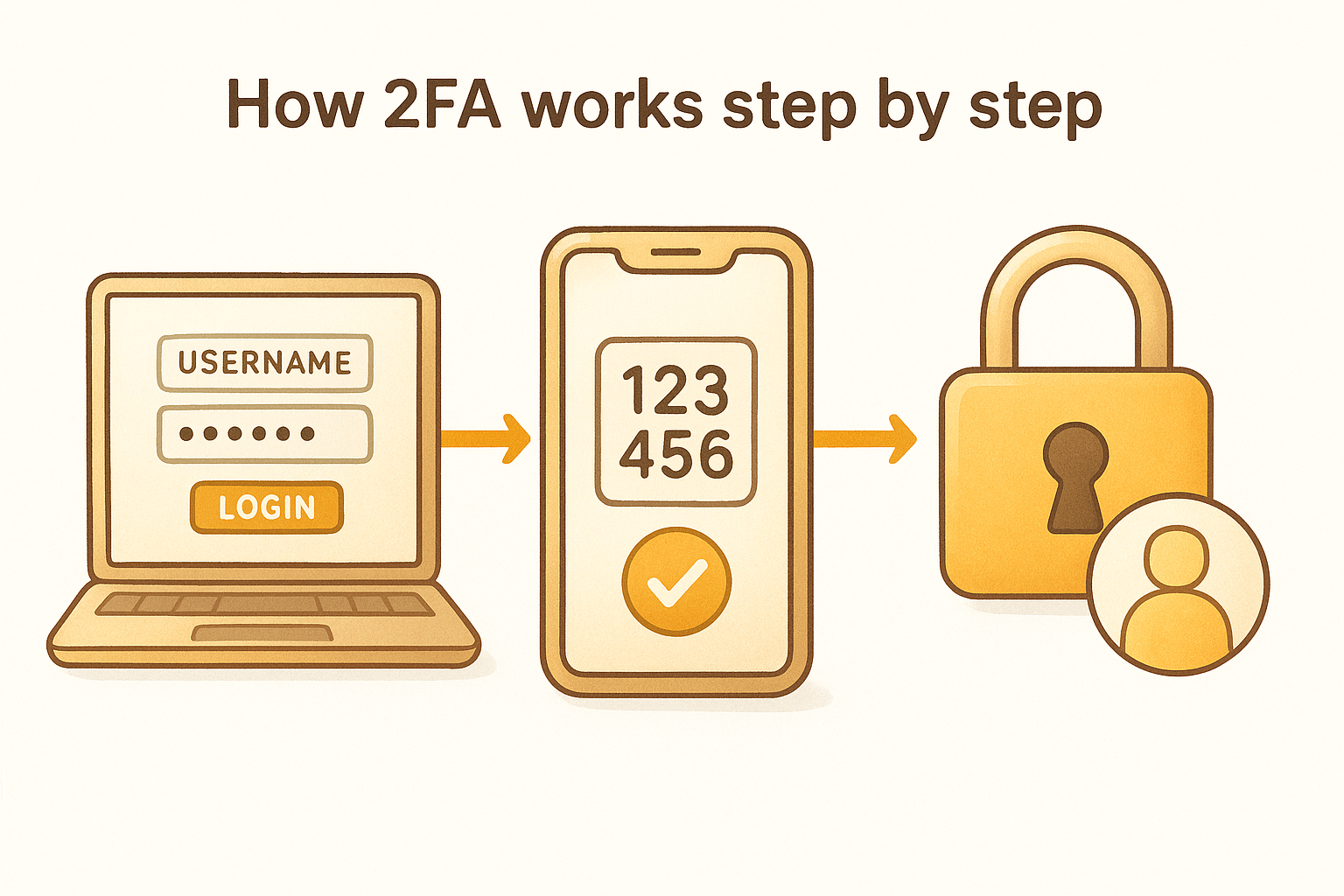
The two factor authentication definition becomes clearer when you see the actual verification sequence in action. Every 2FA system follows a similar pattern regardless of which specific method you choose, and understanding this process helps you recognize what's happening at each stage when you log into protected accounts.
The initial login attempt
You begin by entering your username and password exactly as you would on any standard login screen. The system checks these credentials against its database to confirm that the password matches the one associated with your account. This first step verifies something you know, but the process does not grant access yet.
Behind the scenes, the authentication server recognizes that your account requires two-factor verification and prepares to request your second proof of identity. The system has not denied your login attempt, but it has placed you in a pending state that requires additional confirmation before allowing entry to your account.
The second factor request
After validating your password, the system immediately presents a secondary verification screen asking for your second authentication factor. The exact request depends on which 2FA method you configured for your account. You might see a prompt to enter a six-digit code from an authenticator app, approve a push notification on your registered phone, insert a physical security key into your computer's USB port, or provide a biometric scan like your fingerprint.
The system will not proceed until you successfully provide this second proof that came from a different authentication category than your password.
Most time-based codes expire within 30 to 60 seconds, creating a narrow window that makes stolen codes useless to attackers trying to use them later. Push notifications require you to actively approve the login attempt on your physical device, ensuring that someone who only stole your password cannot complete the authentication sequence.
Verification and access
The authentication server validates your second factor by checking that the code matches its expected value, confirming that your security key contains the correct cryptographic signature, or verifying that your biometric data matches stored records. Only after successfully confirming both factors does the system grant access to your account and establish a secure session for your activities.
Failed verification attempts trigger security protocols that may lock your account temporarily, send alert notifications to your registered email, or require additional identity confirmation before allowing further login attempts.
Common 2FA methods and which to choose
Multiple technologies can serve as your second authentication factor, but they offer vastly different security levels and practical tradeoffs. The two factor authentication definition remains consistent across all these methods, yet your choice determines how effectively you protect your accounts from targeted attacks versus automated credential stuffing.
SMS text message codes
Text message verification sends a temporary code to your registered phone number that you enter after providing your password. This method appears on most websites as the default 2FA option because nearly everyone owns a mobile phone and the implementation costs providers almost nothing.
SMS codes protect you from automated attacks but remain vulnerable to SIM swapping, where attackers convince your mobile carrier to transfer your phone number to a device they control. Criminals have successfully stolen millions in cryptocurrency using this exact technique, making SMS the weakest 2FA option for protecting valuable accounts. You should use it only when stronger methods are unavailable on a particular platform.
Authenticator apps
Software authenticators like Google Authenticator or Microsoft Authenticator generate time-based codes directly on your smartphone without requiring cellular service or internet connectivity. These apps calculate verification codes using a shared secret key established when you first configure 2FA, producing a new six-digit number every 30 seconds.
Authenticator apps provide significantly stronger protection than SMS because attackers cannot intercept codes through phone carrier vulnerabilities.
The codes exist only on your physical device, meaning someone who steals your password still cannot access your account without holding your actual phone. This method strikes an excellent balance between security and convenience for most users protecting cryptocurrency exchanges, email accounts, and financial platforms.
Hardware security keys
Physical security keys like YubiKey represent the strongest 2FA option currently available to consumers. These small devices plug into your computer's USB port or connect via NFC to verify your identity through cryptographic signatures that cannot be phished or intercepted.
Security keys eliminate the risk of code interception entirely because they never transmit any reusable information. You simply insert the key and press its button to confirm login attempts, creating an authentication method that stops even sophisticated attackers who create fake websites designed to steal verification codes.
Biometric verification
Fingerprint scanners and facial recognition built into modern smartphones provide convenient second-factor authentication that verifies your physical presence at the device. Your biometric data never leaves your phone, instead unlocking a locally stored cryptographic key that completes the authentication process.
How to enable 2FA on your accounts
Activating two-factor authentication takes only a few minutes per account, but the protection it provides lasts as long as you keep it enabled. Most major platforms have made the setup process straightforward, though the exact steps vary depending on which service you're securing and which 2FA method you choose. Following the two factor authentication definition means you'll configure both your password and a second verification factor during this process.
Finding the security settings
You'll locate 2FA options inside your account's security or privacy settings rather than in general preferences. Look for labels like "Two-Factor Authentication," "2-Step Verification," "Login Verification," or similar terms depending on the platform. Major services like Google, Microsoft, and most cryptocurrency exchanges place these controls in a dedicated security section that appears after you log into your account.
Some platforms hide 2FA settings under advanced options, so you may need to expand additional menus or click "Show more" to reveal the full list of security features.
Financial institutions and crypto exchanges typically display prominent security reminders on your dashboard if you haven't enabled 2FA yet, making the option easier to find than on social media or email platforms.
Choosing and configuring your method
After accessing the 2FA settings, you'll select which authentication method you want to use from the available options. The platform guides you through linking your chosen factor, which might involve scanning a QR code with an authenticator app, entering your phone number for SMS codes, or registering a physical security key.
Authenticator apps require you to scan a unique QR code displayed on screen using your phone's camera through the app. This process creates the shared secret that generates your time-based codes. Hardware keys need you to insert the device and press its button when prompted to complete registration.
Saving backup codes
Most services provide a set of one-time backup codes immediately after you enable 2FA. Each code works only once and serves as a recovery method if you lose access to your primary authentication device. You must save these codes in a secure location separate from your phone, such as a password manager or a physical paper stored in a safe place.
Losing both your authentication device and backup codes can permanently lock you out of your account, making this step critical for anyone protecting cryptocurrency or important financial accounts.
Quick recap
The two factor authentication definition centers on requiring two separate verification methods from different categories before granting account access. Your password (something you know) combines with a physical device like your phone or security key (something you have) or biometric data (something you are) to create protection that stops 99% of automated attacks.
Passwords alone fail because breaches expose billions of credentials annually, and attackers use these stolen logins across every platform they can access. Adding 2FA blocks unauthorized access even when criminals possess your correct password, making it essential protection for cryptocurrency wallets, exchange accounts, and any platform holding financial value.
You have multiple 2FA options ranging from SMS codes to authenticator apps to hardware security keys, with stronger methods providing better protection against sophisticated attacks. Enabling this security layer takes only minutes but delivers permanent protection for everything you own online. At FinTech Dynasty, we focus on practical security education that helps you protect your digital assets without the hype or confusion common in the crypto space.