
FINTECH DYNASTY • WALLET GUIDE
Trezor Safe 7
A premium self-custody hardware wallet with a 2.5-inch colour touchscreen, dual secure elements, encrypted Bluetooth and USB-C connectivity.
This educational guide examines Safe 7 hardware, backup options, supported assets and security trade-offs using Trezor's published documentation; it is not a hands-on review.
Check Price at Trezor ↗Opens Trezor through our affiliate link. Confirm model, availability, pricing and delivery before purchasing.
Affiliate disclosure: FinTech Dynasty may earn a commission from qualifying purchases through our Trezor links, at no additional cost to you.
Information reviewed: October 11, 2026. Product specifications and supported assets can change; check Trezor's current documentation.
What does it do?
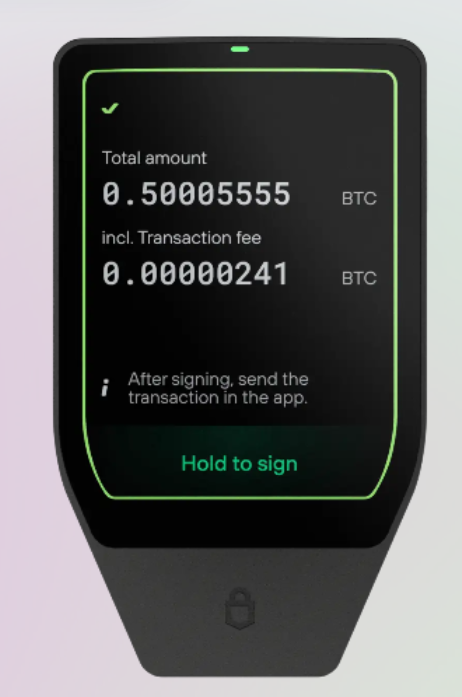
Trezor Safe 7 keeps the keys used to authorize cryptocurrency transactions on a dedicated device. You manage accounts using Trezor Suite or compatible third-party software, then review and confirm transaction details on the Safe 7 touchscreen. The device is not an air-gapped wallet: it connects through encrypted Bluetooth or USB-C.
Its security architecture combines two secure elements (TROPIC01 and OPTIGA Trust M) with an STM32U5 microcontroller. Trezor also describes post-quantum protections for device integrity, firmware updates and authentication; these claims do not mean blockchain assets or all transaction signatures are quantum-proof.
Key specifications
| Wallet type | Self-custody hardware wallet |
|---|---|
| Display | 2.5-inch colour touchscreen, 520 × 380 pixels; haptic feedback |
| Connectivity | Encrypted Bluetooth 5.0+ and USB-C; Bluetooth can be disabled |
| Security hardware | TROPIC01 auditable secure element, OPTIGA Trust M EAL6+ secure element and STM32U5 MCU |
| Firmware | Open-source Trezor firmware with authenticated boot and update mechanisms |
| Backup formats | 20-word SLIP39 single-share default; SLIP39 multi-share and BIP39 12-/24-word options |
| PIN | PIN protection; Trezor lists up to 50 digits |
| Power | 330 mAh LiFePO₄ battery; USB-C and Qi2-compatible wireless charging |
| Construction | Anodized aluminium unibody, Gorilla Glass 3, IP54-rated dust and splash resistance |
| Dimensions / weight | 75.4 × 44.5 × 8.3 mm; 45 g |
| Assets | Thousands of coins and tokens; availability depends on asset, network and software integration |
| Authentication | FIDO2 authentication support |
Specifications are manufacturer-reported. Hardware certifications do not guarantee protection against every vulnerability or user error.
Security features and trade-offs
Useful protections
- On-device confirmation: review addresses and amounts on the trusted touchscreen.
- Layered chips: two secure elements and a separate microcontroller contribute distinct protections.
- Auditable software: open-source firmware permits independent inspection and research.
- Encrypted connections: Trezor Host Protocol protects Bluetooth and USB communication.
- Backup flexibility: single-share or multi-share wallet backups, plus optional passphrase protection.
Limits to understand
- Not air-gapped: the device communicates with a connected host, although signing keys remain on-device.
- Phishing and malicious approvals: a secure wallet cannot make an unsafe recipient or smart contract safe.
- Recovery exposure: someone with the correct backup and optional passphrase may restore access elsewhere.
- Physical research findings: Trezor disclosed a 2026 laser fault-injection vulnerability in the TROPIC01 chip; it says the layered Safe 7 architecture mitigates this chip-level issue.
- Quantum scope: post-quantum device authentication is not a claim that every supported blockchain is quantum-resistant.
Supported assets and software
Trezor lists broad support for cryptocurrencies and tokens through Trezor Suite and compatible third-party wallet apps. Support differs by coin, network and feature. Check the specific asset on Trezor's current coin-support pages before transferring funds.
For XRP holders: verify current XRP Ledger compatibility, whether the asset is managed directly in Trezor Suite or through another supported interface, and any destination-tag or reserve requirements before sending XRP.
Understand backup and recovery
1. Default 20-word wallet backup
The default Safe 7 setup uses a 20-word SLIP39 single-share backup. It can also use compatible BIP39 12- or 24-word formats. The backup can restore wallet access after loss or failure of the device.
2. Multi-share backup
SLIP39 multi-share backup distributes recovery information across multiple shares. Recovery requires the configured threshold of shares. Keep each share protected and understand the threshold before relying on this setup.
3. Optional passphrase and PIN
A PIN helps restrict access to the physical device. An optional passphrase creates a different wallet from the same backup words; forgetting it can make that wallet inaccessible. The PIN is not a substitute for an offline wallet backup.
What is included?
Trezor lists the Safe 7 wallet, a USB-C to USB-C cable, two 20-word backup cards, a start-up guide, a safety guide and stickers. Verify current packaging and bundle contents at checkout.
A careful first setup
- Inspect the package. Buy through an authorized source and check the device and tamper-evident seal.
- Use official software. Download Trezor Suite using the manufacturer's official instructions.
- Authenticate and update. Follow Trezor Suite's device authenticity and firmware checks.
- Set a strong PIN. Choose a PIN you can remember without exposing it.
- Create your backup. Record the recovery words offline and verify them through the device's backup-check feature.
- Understand extra options. Consider passphrase or multi-share only after learning their recovery consequences.
- Test carefully. Verify the asset, network and on-device address before making a small initial transfer.
Who might consider it?
Our assessment: Safe 7 may suit users who want a large touchscreen, wireless convenience, transparent firmware and multiple hardware security layers. Users seeking a strictly air-gapped signing workflow may prefer to compare other wallet designs. No hardware wallet eliminates recovery, phishing or transaction-approval risks.
Common questions
Is the Trezor Safe 7 air-gapped?
No. It connects through encrypted Bluetooth or USB-C. You can turn off Bluetooth and use only USB-C.
Is Safe 7 open source?
Trezor publishes auditable firmware and documents its security architecture. The device combines an auditable TROPIC01 secure element with another certified secure element.
Does Safe 7 support XRP?
Check Trezor's live supported-coins information and the exact wallet software required for XRP before moving funds. Coin support and integrations can change.
What happens if the battery fails?
Trezor states the Safe 7 can continue operating with power supplied through USB-C.
What does quantum-ready mean?
It refers to post-quantum cryptographic protections in the device's boot, firmware and authentication systems. It does not make every blockchain transaction quantum-safe.
What if I lose the device?
You can restore a compatible wallet with the correct backup shares or words and any optional passphrase you used.
Does it have a known vulnerability?
In 2026, Trezor publicly discussed a laser fault-injection attack against the TROPIC01 chip in isolation. Trezor says Safe 7's additional hardware security layers limit the implications for the complete wallet.
Compare before you choose
Check Trezor Safe 7's current specifications, supported coins, prices and availability with the manufacturer.
Check Price at Trezor ↗Back to Hardware Wallet StoreOfficial references
- Trezor Safe 7 official product page and specifications
- Trezor security architecture
- Wallet backup formats
- TROPIC01 vulnerability disclosure
Educational content, not financial advice. No trading. No hype. Verify all specifications and compatibility before purchasing.