
FINTECH DYNASTY • WALLET GUIDE
ELLIPAL Titan Mini
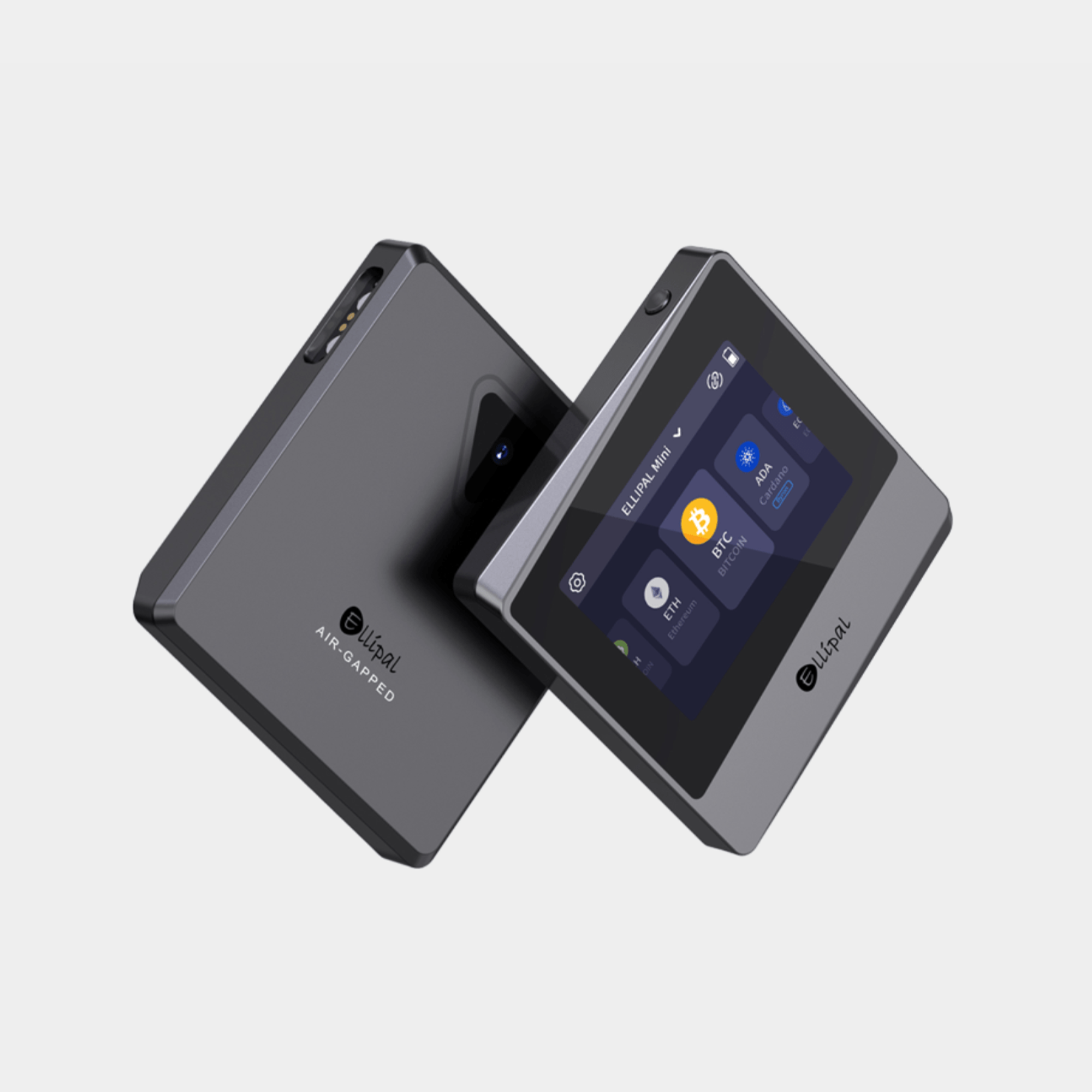
An air-gapped hardware wallet with a 2.7-inch touchscreen and offline QR-code transaction signing.
This guide examines the Titan Mini’s hardware, recovery methods, compatible assets and security trade-offs. It is based on manufacturer documentation, not a hands-on product test.
Check Price at ELLIPAL ↗Opens the ELLIPAL store. Confirm the Titan Mini model, bundle, price, shipping and stock before purchasing.
Affiliate disclosure: FinTech Dynasty may earn a commission from qualifying purchases through our ELLIPAL shopping links, at no additional cost to you.
Information checked: October 11, 2026. Features, compatibility and package contents may change; confirm details with ELLIPAL.
What does it do?
ELLIPAL Titan Mini is a self-custody hardware wallet designed to keep private keys offline. Its companion mobile app prepares and broadcasts transactions, while the Titan Mini reviews and signs them without a Wi-Fi, Bluetooth, NFC or USB data connection.
Transactions move between the app and the device using QR codes. The wallet’s 2.7-inch screen allows transaction details to be checked on the signing device rather than relying only on the phone display.
Key specifications
| Wallet type | Self-custody, air-gapped hardware wallet |
|---|---|
| Display | 2.7-inch colour IPS touchscreen |
| Transaction signing | Offline QR-code scanning between the device and companion app |
| Connectivity | No Wi-Fi, Bluetooth, NFC or USB data connection for transaction signing |
| Secure element | Manufacturer-listed CC EAL5+ secure chip |
| Body | Sealed metal casing with manufacturer-described tamper-triggered key erasure |
| Recovery phrase | Creates a 12-word phrase; supports recovery from compatible 12-, 15-, 18-, 21- or 24-word phrases |
| Passphrase | Optional BIP39 passphrase support |
| Firmware updates | Offline via security adapter and microSD card |
| Supported assets | Manufacturer advertises 10,000+ tokens across 45+ blockchains; verify each asset and network |
| Companion app | ELLIPAL mobile app for iOS and Android |
| Dimensions and weight | 75 × 71 × 10.5 mm; approximately 120 g |
| Battery | 600 mAh rechargeable battery |
Specifications are manufacturer-reported. Certification claims and offline signing do not guarantee immunity from every attack.
Security features and trade-offs
Useful protections
- Air-gapped design: no conventional wired or wireless data connection for signing transactions.
- Independent screen: transaction details can be inspected on the hardware wallet.
- Secure element: a dedicated chip is designed to protect private keys.
- Sealed metal body: ELLIPAL advertises tamper detection with automatic key erasure if forced open.
- Passphrase option: an additional secret can separate a passphrase-protected wallet from the standard recovery-phrase wallet.
Limits to understand
- QR codes still carry data: air-gapped does not mean transaction inputs are automatically safe. Check the details displayed on the Titan.
- Mobile-app dependence: the phone app is still used to create and broadcast transactions and to display balances.
- Recovery responsibility: losing the recovery phrase and all usable recovery methods can permanently prevent access.
- Firmware and software trust: review the manufacturer's update process and independent security assessments; do not assume every component is publicly auditable.
- Physical tampering: automatic erasure is a manufacturer-described protection, not a substitute for backups.
Supported assets and phone compatibility
ELLIPAL advertises support for thousands of tokens across multiple blockchains, but compatibility can vary by asset, token standard, network and app version. Verify the exact asset and network in ELLIPAL’s current compatibility information before sending funds.
The Titan Mini works alongside the ELLIPAL mobile app on supported iOS and Android phones. ELLIPAL also describes integration with services such as WalletConnect and MetaMask; these integrations do not make every decentralized application or transaction safe.
For XRP holders: check current XRP Ledger support and confirm the destination address, destination-tag requirements and network reserve before transferring XRP.
Understand the recovery and access options
1. The recovery phrase
The Titan Mini can generate a 12-word recovery phrase on the device. This is the critical backup for restoring the wallet if the hardware is lost or damaged. Record it offline and store it securely; never enter it into a website or share it with support.
2. An optional passphrase
ELLIPAL supports an optional BIP39 passphrase in addition to the recovery phrase. It changes which wallet is derived from the backup. An incorrect or forgotten passphrase can prevent access to passphrase-protected funds even when the recovery words are correct.
3. Device password and wallet access
The device password restricts access to the hardware wallet. It is separate from the recovery phrase and any optional passphrase. A device password is not a replacement for a properly protected recovery backup.
What is included?
ELLIPAL lists the Titan Mini, a security adapter, a 16 GB microSD card, a charging cable, a manual and a recovery-phrase card as standard package contents. Bundles may add accessories such as a metal recovery backup; confirm the current listing before purchasing.
A careful first setup
- Check the source. Obtain the wallet through ELLIPAL or an authorized seller and inspect the packaging and device.
- Install the official app. Use ELLIPAL’s official download instructions, not links from unsolicited messages or advertisements.
- Create a new wallet offline. Follow the Titan Mini device prompts and choose a strong device password.
- Back up recovery words. Write and verify the generated phrase offline, away from cameras and cloud services.
- Consider passphrase implications. Only enable an optional passphrase if you understand how it affects recovery.
- Connect by QR code. Pair the offline wallet with the companion app using the official QR workflow.
- Test with a small transfer. Verify the asset, network, receiving address and transaction details on the Titan Mini screen before transferring larger amounts.
Who might consider it?
Our assessment: the Titan Mini may appeal to users who prioritise offline transaction signing and want a compact touchscreen for checking transaction details. Its trade-offs include a QR-code workflow, reliance on a companion phone app and the responsibility of safeguarding recovery credentials.
Common questions
Does ELLIPAL Titan Mini connect through Bluetooth or USB?
No Bluetooth, Wi-Fi, NFC or USB data connection is used for transaction signing. Transactions are exchanged with the companion app using QR codes.
Can I review transactions on the wallet itself?
Yes. The 2.7-inch touchscreen displays transaction information for review before approval. Always inspect the recipient, amount, network and any permissions shown.
Does the Titan Mini support XRP?
ELLIPAL lists broad multi-chain support, but confirm XRP Ledger availability for the exact device and app version before transferring XRP.
What happens if the wallet is lost or damaged?
Cryptocurrency remains recorded on the blockchain. You may be able to restore access using the correct recovery phrase and any passphrase you enabled, in a compatible wallet.
Does the Titan Mini need charging?
Yes. ELLIPAL lists a rechargeable 600 mAh battery. Charging and offline firmware updates use the compatible security adapter.
Is an air-gapped wallet impossible to hack?
No. Offline signing reduces certain connectivity risks, but malicious transaction requests, compromised companion devices, misleading QR data, firmware issues and recovery-phrase theft remain relevant threats.
Can I update firmware while keeping the wallet offline?
ELLIPAL describes an offline update process using a security adapter and microSD card. Follow the manufacturer’s current instructions and verify the source of update files.
Compare before you choose
Review the ELLIPAL Titan Mini, current asset support, available packages and delivery options directly with ELLIPAL.
Check Price at ELLIPAL ↗Back to Hardware Wallet StoreOfficial references
- ELLIPAL Titan Mini product page and technical specifications
- Official Titan setup guide
- ELLIPAL help center
Educational information, not financial advice. Manufacturer claims are not independent guarantees. No wallet eliminates every risk.