

Top 5 Crypto Wallets for Beginners in 2026
Last Updated: November 5, 2026
Quick Summary
The top 5 crypto wallets for beginners are a structured beginner course, a mainstream mobile software wallet, a browser extension wallet, a hardware wallet, and a metal seed phrase backup kit. Choose based on custody, setup effort, and cost: mobile wallets suit small balances, hardware wallets suit long-term holdings.
- The crypto wallet market is projected to grow from $19.3 billion in 2026 to $100.8 billion by 2033.
- A non-custodial wallet stores the key with you, making the recovery phrase your responsibility.
- Use a browser extension wallet for web3 apps but keep it separate from long-term holdings.
- Never type your recovery phrase into a website, chat, or support form.
- Run a recovery drill on a small test amount before real money is at stake.
Table of Contents
- What Makes a Crypto Wallet Beginner-Friendly
- The Top 5 Crypto Wallets for Beginners Compared
- The Best Crypto Wallet for Beginners by Use Case
- Choosing the Best Crypto Wallet App for Your Phone
- Are the Top 5 Crypto Wallets for Beginners Free to Use?
- What Reddit Gets Right About Top 5 Crypto Wallets for Beginners
- A Step-by-Step Security Setup and Recovery Drill
- Start Your Self-Custody Education Today
- Frequently Asked Questions
What Makes a Crypto Wallet Beginner-Friendly
A beginner-friendly crypto wallet is one that keeps your keys under your control while making setup, backup, and everyday sending simple enough to repeat without fear. The crypto wallet market is projected to grow from $19.3 billion in 2026 to $100.8 billion by 2033, according to Datawallet's crypto wallet statistics and trends report, which means more first-time buyers are choosing their first wallet right now.
Custody, Setup, and Cost: The Three Filters
Custody decides who controls the assets. A custodial wallet keeps your private key on someone else's server, so you log in like a bank app.
Setup covers the practical steps: download, create a password, write down 12 or 24 words, confirm them, and fund the wallet.
Cost is rarely a subscription. Most software wallets are free to download, and you pay network fees when you send or swap.
The Top 5 Crypto Wallets for Beginners Compared
Ranking wallets means ranking trade-offs, not declaring a single winner. Our shortlist weighs setup difficulty, asset support, security model, and cost. We favour wallets that explain recovery clearly, because that is where beginners lose money.
- FinTech Dynasty Course, a structured course for beginners who want education before they touch a seed phrase. The course covers how wallets interact with blockchain networks, hot versus cold storage, and how to protect digital assets, with no trading and no hype. A metal backup can be paired with it for a self-custody routine.
- A mainstream mobile software wallet, a common route to a first wallet address, suited to small balances and everyday spending. The phone becomes a single point of failure.
- A browser extension wallet, the standard choice for connecting to decentralized applications. Convenient on desktop, but it lives in the same browser you use for email and shopping, so phishing risk rises.
- A hardware wallet, the strongest option for holdings you do not plan to move. A device alone does not teach recovery discipline; the seed phrase backup still decides whether you can restore.
- A metal seed phrase backup kit, not a wallet itself, but the piece most beginners skip. It protects the recovery phrase from fire, water, and time, which paper cannot.
Quick Comparison Table
| Option | Setup Effort | Best For | Cost Model | Main Trade-off |
|---|---|---|---|---|
| FinTech Dynasty Course + guided setup | Low, structured lessons | Beginners who want to understand before acting | One-time course purchase | Requires time to study |
| Mobile software wallet | Very low | Small balances, daily spending | Free app, network fees | Phone is a single point of failure |
| Browser extension wallet | Low | dApp and web3 use | Free app, network fees | Higher phishing exposure |
| Hardware wallet | Medium | Long-term holdings | One-time device purchase | Backup discipline still required |
| Metal seed phrase backup | Low | Protecting the recovery phrase | One-time purchase | Not a wallet on its own |
The Best Crypto Wallet for Beginners by Use Case
There is no universal best crypto wallet for beginners, only the best fit for what you plan to do in your first year. A short decision path starts with three questions: how much you are holding, which blockchains you need, and whether you will connect to decentralized applications. Answer those and the category usually picks itself.
A beginner decision path
- Is the balance small enough that losing the phone would be annoying but not devastating? If yes, start with a mobile software wallet and keep the amount modest while you learn how addresses and fees behave.
- Are you holding for years rather than weeks? Move to a hardware wallet once the amount matters, and back up the recovery phrase on metal from day one.
- Do you need to connect to web3 apps, mint tokens, or swap on decentralized exchanges? Use a browser extension wallet, but keep it separate from long-term holdings so a phishing click cannot reach your savings.
- Are you still learning how keys and networks work? Start with structured education before funding anything.
Matching wallets to common beginner situations
- First purchase, small amount: a mainstream mobile software wallet such as Trust Wallet or the Coinbase Wallet app. Both support Bitcoin, Ethereum, and a broad set of tokens, and both walk you through a 12-word recovery phrase during setup.
- Planning to hold for years: a hardware wallet from an established vendor such as Ledger or Trezor, backed up on metal from day one. These devices keep the private key offline, but the seed phrase backup still decides whether you can restore.
- Exploring decentralized applications: a browser extension wallet such as MetaMask, the standard connector for Ethereum-compatible apps. It is convenient on desktop, but phishing risk rises, so keep it separate from long-term holdings.
If you are weighing two popular software wallets specifically, our MetaMask vs Trust Wallet comparison sets out supported networks, everyday uses, and the security considerations that separate them.
Watch out: beginners often install two wallets and reuse the same recovery phrase in both. That defeats the purpose, because one compromised phrase exposes every wallet built from it.
Choosing the Best Crypto Wallet App for Your Phone
A useful test for a crypto wallet app is whether you can operate it comfortably, with a recovery phrase you have already stored offline.
Use a device passcode and enable two-factor authentication for any linked exchange account. SMS codes are vulnerable to SIM-swap attacks, so app-based or hardware-key methods are the safer default; our guide on choosing 2FA for crypto that stops SIM swaps explains which methods hold up.
Then reduce the attack surface. Install the wallet from the official app store listing, verify the developer name, and never install a wallet from a link someone sends you.
Best for: everyday spending and small balances. Skip if: you are storing an amount you could not afford to lose.
Are the Top 5 Crypto Wallets for Beginners Free to Use?
Many beginner wallets are free to download, and much of the cost typically sits in network fees and hardware. Three different charges get lumped together: blockchain network fees, wallet or app service fees, and one-time hardware or backup costs. Separating them is the difference between a wallet that looks free and one that actually is.
Network fees versus wallet fees
A network fee is paid to the blockchain, not the wallet; sending Bitcoin or Ethereum costs a fee that varies with congestion, and the wallet passes it through. Because app fees can compound across frequent swaps, compare them with network costs before day trading cryptocurrency, where repeated transactions make fee awareness especially important.
Metal Crypto Seed Phrase Storage, BIP39 Recovery Phrase Cold Storage Backup →
Beginners often compare wallets on download price and ignore the swap spread. Two wallets can both be free to install while one charges noticeably more when you convert one token to another. Check the fee disclosure inside the app before you swap, not after.
Like-for-like cost examples
- Sending Bitcoin or Ethereum: the cost is the network fee, which fluctuates with congestion. A wallet that shows you the estimated fee before you confirm is behaving correctly; one that hides it is not.
- Swapping one token for another: expect a network fee plus a service spread. Compare the quoted rate against a public price before confirming.
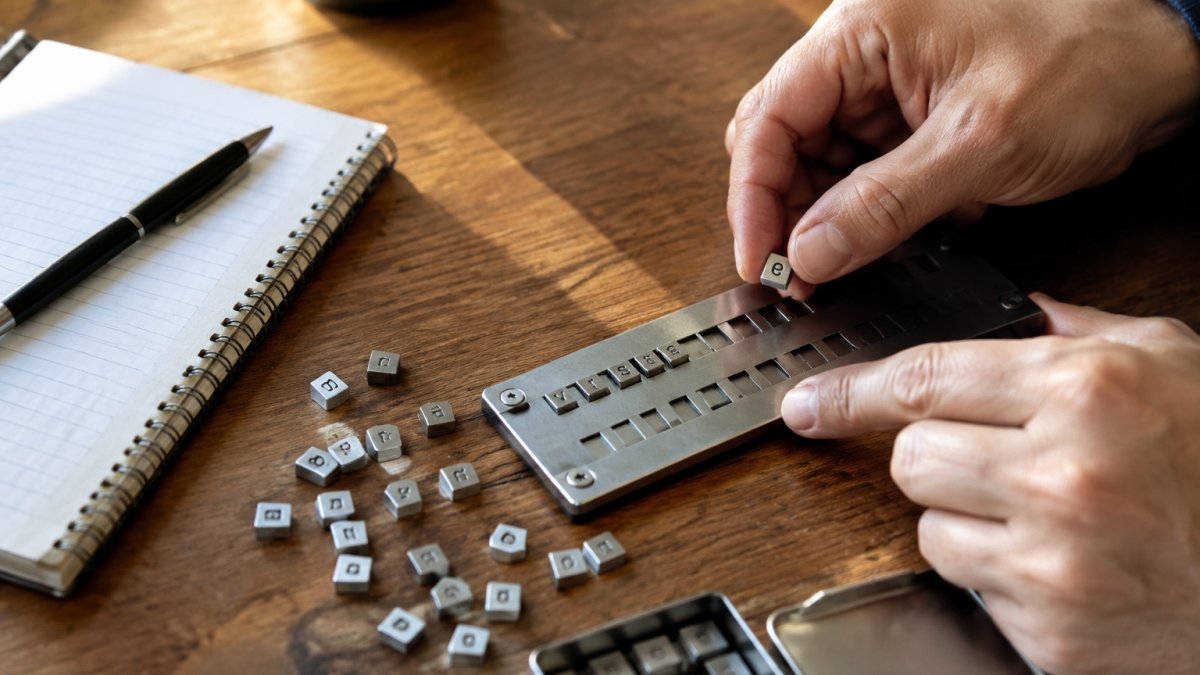
- Metal seed phrase backup: a one-time purchase rather than a recurring charge, replacing a paper backup that degrades. Our metal seed phrase storage plate with 480 letter tiles stores full 8-letter BIP39 words without abbreviation, holds 12-word or 24-word phrases, and is heat and water resistant. At a one-time cost, it is a low-cost backup option.
Watch out: "free" wallets that ask for a deposit before you can withdraw are not free. Legitimate software wallets never charge you to hold your own keys, and no legitimate wallet needs your recovery phrase to process a fee.

What Reddit Gets Right About Top 5 Crypto Wallets for Beginners
Reddit threads about the top 5 crypto wallets for beginners are noisy, but the recurring warnings are accurate. Three themes come up again and again, and each one matches what we teach.
First, "not your keys, not your coins." Forum regulars push back hard on custodial convenience once balances grow, and they are right to. Second, seed phrase hygiene. Never type your recovery phrase into a website, a chat, or a support form; no legitimate support agent will ever ask for it. Third, skepticism about token approvals. Signing an unlimited approval to a smart contract can let it drain a token later, so check and revoke approvals.
What Reddit gets wrong is the pace. Threads assume you already understand hot wallets, cold wallets, and network fees. If you are starting from zero, the arguments read as contradictions rather than guidance.
A Step-by-Step Security Setup and Recovery Drill
A recovery drill is a practice restore performed before real money is at stake, and it is the single habit that separates prepared beginners from people who lose access permanently.
- Create the wallet and write the phrase by hand. Number each of the 12 or 24 words in order; order matters more than most beginners realise.
- Verify the phrase immediately. Most wallets ask you to confirm several words during setup. Do it carefully rather than clicking through.
- Transfer the phrase to metal. Arrange the full words on a metal backup plate, lock it, and store it somewhere discreet and offline.
- Destroy the paper copy once the metal backup is verified, or store it in a second secure location for redundancy.
- Send a small test amount, then wipe and restore the wallet from your backup. Confirm the balance reappears.
- Record where the backup lives, without recording the phrase itself, so a trusted person could locate it in an emergency.
- Repeat the drill after any change of device or storage location.
Our beginner's guide to securing crypto seed phrases goes deeper on each step, including how to think about inheritance and beneficiary access.
Watch out: photographing your seed phrase "just in case" puts it in cloud backups, where a single account compromise exposes everything.
Start Your Self-Custody Education Today
The uncomfortable truth is that wallet software is the easy part. Recovery discipline is a learnable skill. Losing access often comes down to a lost phrase, an abbreviated word, or a backup stored somewhere that failed.
FinTech Dynasty's course covers how cryptocurrency systems work, how wallets interact with blockchain networks, the difference between hot wallets and cold storage, and how to interact with crypto systems responsibly, without trading calls or hype. For a same-topic starting point, read the crypto self custody for beginners guide.
Frequently Asked Questions
What is the best beginner crypto wallet?
There is no single best wallet for every beginner. The right choice depends on how much you hold and how you plan to use it. A mobile hot wallet suits small, active balances and everyday spending. A hardware wallet suits larger holdings you rarely move. Start with the wallet that matches your habits, then add a second one as your balance grows. FinTech Dynasty's course walks through how wallets interact with blockchain networks so you can judge the trade-offs yourself.
Are crypto wallets free to use?
Most software wallets, including mobile and browser wallets, are free to download and set up. Hardware wallets cost money, and Network fees still apply when you send a transaction, and those fees vary by blockchain and congestion. The wallet itself is often free; the cost sits in hardware and transaction fees.
What is the difference between a hot wallet and a cold wallet?
A hot wallet connects to the internet, usually through a phone app or browser extension, which makes it convenient for frequent transactions but exposes it to online threats. A cold wallet keeps your private keys offline, typically on a hardware device, so a compromised computer cannot reach them. Most beginners use both: a hot wallet for small amounts and a cold wallet for savings.
How do beginners keep a crypto wallet safe?
Write your recovery phrase on paper or metal and store it offline, never in a photo or cloud note. A metal backup, such as the FinTech Dynasty seed phrase plate, can store full 8-letter BIP39 words and is heat and water resistant. Enable two-factor authentication on any exchange account, verify app downloads from official sources, and test your recovery before you hold real funds. Run through the recovery once so you know the process works.
Do I need a separate wallet for each cryptocurrency?
Not usually. Most modern wallets are multi-chain and support Bitcoin, Ethereum, Solana, and many tokens from one interface. Check the supported assets list before you commit, because some wallets cover only one network. If you hold assets on a chain your main wallet does not support, a second wallet for that network is simpler than moving everything. Confirm network support before you send anything.
