

Ledger Alternatives for Secure Storage: 2026 Guide
Table of Contents
- Why Consider Ledger Alternatives for Secure Storage
- Ledger vs Trezor: Core Differences for Self-Custody
- Best Hardware Wallets Beyond Ledger
- Hardware Wallet Recovery Phrase: Backup and Storage
- Hardware Wallet Security: What Actually Protects Your Assets
- Practical Setup: Ease of Use and Mobile Compatibility
- Pricing and Long-Term Ownership Costs
- Frequently Asked Questions
Last Updated: October 17, 2026
Why Consider Ledger Alternatives for Secure Storage
When you hold cryptocurrency in self-custody, you're responsible for protecting your private keys. Ledger is the most popular hardware wallet globally, but it's not the only option. At FinTech Dynasty, we help beginners understand that the right cold storage solution depends on your specific threat model, the assets you hold, and how you plan to access them over time.
The core question isn't "Is Ledger good?", it clearly is. The real question is whether it's the best fit for your particular situation. Some users need different device types. Others prioritize specific blockchain networks or recovery methods. A few have concerns about centralized firmware updates or prefer open-source alternatives. Understanding these trade-offs helps you choose confidently.
Ledger vs Trezor: Core Differences for Self-Custody
Both Ledger and Trezor are established hardware wallets, but they approach security and user experience differently. Trezor emphasizes open-source firmware and operates an air-gapped transaction signing model, meaning the device never connects directly to the internet during critical operations.

For beginners, the practical difference comes down to this: Trezor prioritizes transparency and independent security auditing. If you want to inspect the code running on your device, Trezor's open-source approach appeals to technical users. Ledger prioritizes ease of use and mobile support.
Recovery phrase handling differs too. Both use BIP39 standard recovery phrases, but Trezor generates and stores your seed phrase on the device, it never leaves the hardware. Ledger generates your seed during setup and displays it for you to write down.

| Aspect | Ledger | Trezor |
|---|---|---|
| Firmware | Proprietary | Open-source |
| Transaction Signing | Connected to app | Air-gapped (separate device) |
| Mobile Support | Strong (iOS/Android apps) | Limited (web-based) |
| Blockchain Networks | 2,000+ | 500+ |
| Price Range | Varies by model | Varies by model |
| Security Audits | Third-party audited | Community-audited, open-source |
Best Hardware Wallets Beyond Ledger
When exploring ledger alternatives for secure storage, you're choosing between different security models, form factors, and feature sets. The best option depends on your specific needs: whether you prioritize maximum asset support, offline transaction signing, or simplified setup.
Device Types and Form Factors
Hardware wallets come in several physical forms, each with trade-offs. The most common is the USB-connected device, compact, portable, and designed to plug into a computer or phone during transactions.
Card-based wallets (the size of a credit card) offer maximum portability and discretion. They're easy to hide or travel with, though they require a card reader for desktop use. Some newer models use NFC (near-field communication) to connect with mobile devices, eliminating cables entirely.
Standalone devices with screens and physical buttons represent another category. These are designed to never connect to the internet, you manually verify transactions on the device's screen and approve them with buttons. This air-gapped model eliminates the risk of malware on your computer intercepting your transaction signing.
Supported Cryptocurrencies and Blockchain Networks
Bitcoin and Ethereum are supported by virtually every hardware wallet. The difference emerges when you hold altcoins or tokens on less common blockchain networks. Ledger supports over 2,000 assets across multiple chains. Trezor supports around 500. Smaller manufacturers often support fewer networks, focusing on the most liquid ones.
This matters practically: if you hold Solana tokens, you need a wallet that explicitly supports the Solana blockchain. If you use staking protocols on multiple chains, you need a device that can sign transactions for each one. Before choosing any wallet, verify it supports every blockchain network you currently use or plan to use.
Some wallets add support through firmware updates. Others require you to use third-party apps (like MetaMask) connected to your hardware wallet for unsupported networks.
Hardware Wallet Recovery Phrase: Backup and Storage
Your recovery phrase is the master key to your funds. If someone gains access to it, they can drain your wallet from anywhere in the world. If you lose it, you lose permanent access to your assets. This is why recovery phrase backup and storage is the single most critical decision you make with any hardware wallet.
Offline Storage and Physical Backup Methods
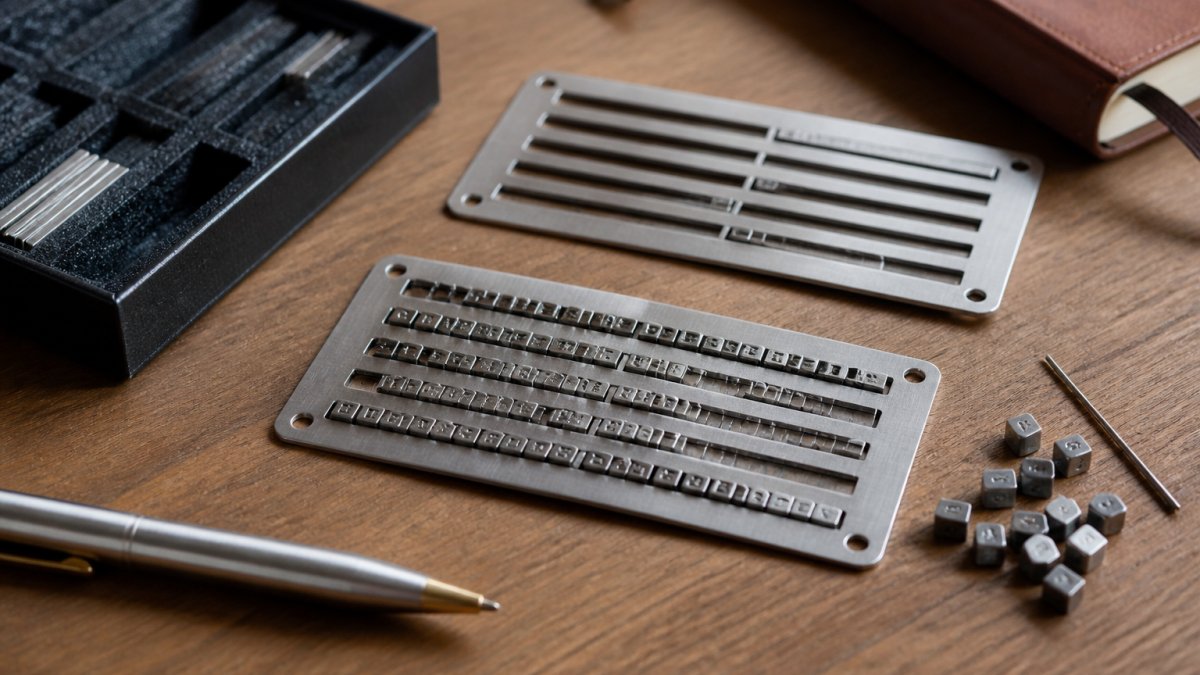
Paper backups are simple but vulnerable. Paper degrades, fades, and can be destroyed by water, fire, or insects.
Metal seed phrase backups solve this problem. FinTech Dynasty offers the Metal Crypto Seed Phrase Storage with 480 metal letter tiles, allowing you to stamp full 8-letter BIP39 words onto durable stainless steel plates.
For those managing multiple wallets or larger seed phrases, the 72-Word Crypto Seed Phrase Storage Capsule offers higher capacity in a cylindrical form factor. This stainless steel capsule uses BIP39 index numbers to achieve denser storage, reducing the physical footprint.
The key principle: your backup should be fireproof, waterproof, and stored in a location separate from your hardware wallet. Never store your device and recovery phrase in the same safe or location. If someone breaks into one, they shouldn't automatically gain access to both.
Recovery and Inheritance Planning
Most users focus on immediate security but ignore what happens if they become incapacitated or die. Your recovery phrase needs to be accessible to trusted beneficiaries without exposing it to theft or loss.
One approach: store your recovery phrase in a safety deposit box at a bank, with instructions in your will for your executor to access it. Another: split your recovery phrase across multiple trusted people (each holds 6 words of a 24-word phrase, making any single person unable to drain your wallet).
For long-term planning, document where your recovery phrase is stored, how to access it, and what your beneficiaries should do with it. Include step-by-step instructions for restoring the wallet on a new device. This documentation should be stored separately from the recovery phrase itself, perhaps in your will or with a trusted attorney.
Hardware Wallet Security: What Actually Protects Your Assets
Security isn't a single feature, it's a system. Your hardware wallet protects your private keys from malware on your computer. Your recovery phrase backup protects your funds if the device is lost or damaged. Your PIN protects the device from casual theft. Together, these layers create real security.
Metal Crypto Seed Phrase Storage, BIP39 Recovery Phrase Cold Storage Backup →
Private Keys and Air-Gapped Transaction Signing
Your private key is the cryptographic proof that you own your funds. It never leaves your hardware wallet. When you approve a transaction, the device signs it using your private key, then sends only the signed transaction (not the key itself) to the blockchain network.
An air-gapped device takes this further: it never connects to the internet. You manually transfer transaction details to the device (via QR code, USB, or NFC), approve on the device's screen with physical buttons, then transfer the signed transaction back to your computer.
For most users, a standard hardware wallet with USB connection and a PIN is sufficient. For high-value holdings or users in high-threat environments, an air-gapped device provides additional peace of mind.
Threat Models and Who Should Use What
Your threat model determines which wallet features matter most. A casual investor with moderate holdings needs basic protection against online theft and malware.
For casual users, any major hardware wallet (Ledger, Trezor, or equivalent) with a PIN and offline recovery phrase backup is sufficient.
For high-value holdings, add an additional layer: use a multisig wallet (multiple signatures required to approve transactions) or store your recovery phrase in a safety deposit box rather than at home.
Practical Setup: Ease of Use and Mobile Compatibility
The best hardware wallet is one you'll actually use.
Most modern hardware wallets support both desktop and mobile. Ledger's app works on iOS and Android. Trezor's mobile support is more limited, primarily web-based through a browser. Smaller manufacturers vary widely.
Setup typically takes 15-30 minutes: initialize the device, generate your recovery phrase, write it down on your backup medium, set a PIN, and install the companion app. The critical step is backing up your recovery phrase correctly, take time here. Rushing through this step is where most security failures happen.
For users aged 35-65 transitioning from exchange trading to self-custody, start with a device that has clear documentation and a simple setup process. For technical users, Trezor's open-source approach and detailed documentation appeal more.
Pricing and Long-Term Ownership Costs
Hardware wallet prices range from around 50 to 300, depending on features and brand. But price isn't the only cost consideration.
A basic hardware wallet costs 50-150. Adding a metal seed phrase backup costs another 45-80. A physical safe for storing your backup costs 280-450.
The key insight: don't choose your wallet based on price alone. Calculate total cost of ownership, including backup durability and replacement frequency.
FinTech Dynasty's Large Double-Door Digital Security Safe at 279.99 provides secure physical storage for your hardware wallet, backup devices, and recovery phrase backups.

For maximum protection, pair a hardware wallet with appropriate backup storage.
Choosing ledger alternatives for secure storage isn't about finding a cheaper option, it's about finding the right security model for your specific situation.
Frequently Asked Questions
What are the best alternatives to Ledger for secure crypto storage?
The main alternatives to Ledger include Trezor, which offers similar cold storage functionality with open-source firmware. Other options depend on your needs: hardware wallets provide offline private key storage for maximum security, while metal seed phrase storage solutions like the 8-letter full-word backup plates offer a non-electronic backup method. Each serves different threat models. Beginners often start with hardware wallets, while long-term holders prioritize recovery phrase security through physical backup systems.
How do I back up a hardware wallet recovery phrase securely?
Write or stamp your 12-word or 24-word BIP39 recovery phrase onto a durable physical medium that resists fire, water, and corrosion. Metal seed phrase storage plates with full 8-letter word support are more reliable than paper backups. Store this backup separately from your hardware wallet device and in a secure location like a safe. Never store your recovery phrase digitally or photograph it. Test your backup by verifying you can read every word clearly before relying on it for recovery.
Is Trezor a safer alternative to Ledger?
Trezor and Ledger use similar security principles: private keys remain offline in a secure element, and transactions require physical confirmation. Trezor emphasizes open-source firmware, while Ledger uses closed-source code. Both protect against online threats effectively. Your choice depends on whether you prioritize open-source auditability or Ledger's established ecosystem.
What should I compare when choosing a Ledger alternative?
Compare these factors: supported cryptocurrencies and blockchain networks (Bitcoin, Ethereum, altcoins), device type (USB, mobile-native, or air-gapped), ease of setup and everyday use, desktop and mobile app compatibility, recovery phrase storage method, and whether the firmware is open-source or proprietary. Also consider pricing, warranty support, and whether the device integrates with your existing wallet software. For inheritance planning, verify that recovery phrases can be securely shared with beneficiaries and that the device supports multi-signature setups if needed.
Can I store cryptocurrency securely without a hardware wallet?
Yes, but with trade-offs. Paper wallets (printed private keys) are offline but fragile and difficult to use. Self-custody via software wallets on air-gapped computers offers security but requires technical skill. For most users, hardware wallets are the practical standard because they automate offline signing and recovery. If you use any method, your recovery phrase backup is critical, store it on metal plates or in a secure safe to prevent loss. Hardware wallets simplify the process while maintaining strong security.