

How To Spot A Phishing Email: 5 Red Flags Before You Click
Your hardware wallet can't protect you from yourself. Phishing emails remain one of the most effective tools scammers use to steal cryptocurrency, and knowing how to spot a phishing email is your first line of defense against losing your digital assets.
These attacks have evolved far beyond the obvious Nigerian prince schemes. Modern phishing attempts impersonate exchanges, wallet providers, and DeFi platforms with alarming accuracy. A single click on a malicious link can lead to drained wallets, compromised seed phrases, and irreversible financial loss.
At FinTech Dynasty, we focus on the practical side of protecting your crypto, and that includes addressing threats beyond hardware security. This guide breaks down five clear warning signs that separate legitimate communications from scams, so you can identify fraudulent emails before they cost you everything.
1. Treat wallet and exchange emails as suspicious
The safest assumption you can make about any email claiming to come from a crypto platform is that it's fake until proven otherwise. This default skepticism protects you from acting on impulse, which is exactly what phishing attacks rely on to succeed. Even if the message looks legitimate, your first response should be to verify it through independent channels before you read the full content or take any action.
Why crypto-themed phishing works so well
Scammers target cryptocurrency users because the stakes are higher and the transactions are irreversible. Unlike credit card fraud, you can't call your bank to reverse a blockchain transfer. Attackers know you store significant value in digital wallets and exchange accounts, making you a profitable target. They also understand that crypto holders check their accounts frequently, so security alerts and withdrawal notifications trigger immediate emotional responses that bypass rational thinking.
The fastest sanity check before you read the message
Before you engage with the email's content, ask yourself if you were expecting this message. If you didn't initiate a withdrawal, request a password reset, or sign up for notifications, the email is almost certainly fraudulent. Check the time stamp and your recent activity to confirm whether the alert matches anything you actually did. This simple pause gives you control before emotion takes over.
Real security alerts match actions you took yourself, not random events that supposedly happened to your account.
Safe ways to verify an alert without replying
Open a new browser tab and manually type the platform's URL instead of clicking any links in the email. Log in through your saved bookmark or by searching the company name directly. Check your account dashboard and notification center for any alerts that match what the email claims. You can also contact support through the platform's official help center, never through contact details provided in a suspicious message.
What to do if the email mentions a withdrawal or login
Treat withdrawal and login alerts as red alert situations that demand immediate verification. Log into your account through the official website or app to confirm whether the activity actually occurred. If you see unauthorized transactions, freeze your account through official channels and move remaining funds to a secure wallet under your control. Never reply to the email or use any "cancel withdrawal" links it provides, as these are designed to capture your credentials.
2. Check the sender address and domain closely
The display name you see in your inbox is meaningless for verification purposes. Scammers can set any display name they want, making an email appear to come from "Coinbase Security" or "Ledger Support" while the actual sender address reveals the fraud. Learning how to spot a phishing email starts with examining the technical details behind the friendly label, which exposes the real source hidden underneath.
Display name tricks that hide the real sender
Email clients show the display name first, which scammers exploit by copying official brand names exactly. The actual sender address sits behind this mask, often ending in random domains that have nothing to do with the company. Click on the sender's name or the details arrow in your email client to reveal the full address, which always tells the truth about who sent the message.
Domain red flags that catch most spoofs
Legitimate companies send from domains they own, such as @coinbase.com or @ledger.com. Watch for misspellings, extra words, or unexpected subdomains like support-ledger.com or coinbase-alerts.net. Free email providers like Gmail, Yahoo, or Outlook in a sender address claiming corporate authority are instant red flags.
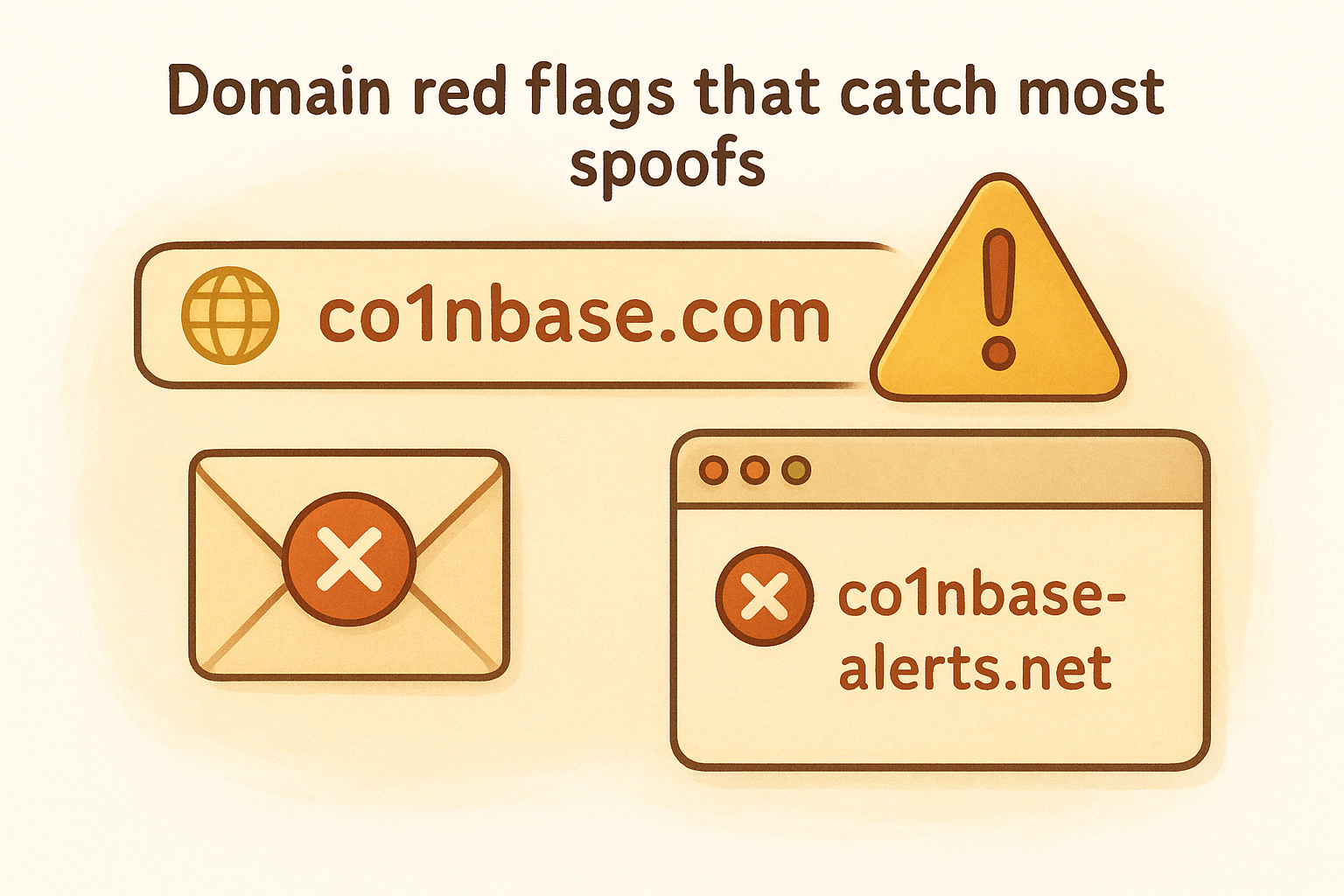
The domain after the @ symbol is the only part of an email address that matters for verification.
How to confirm the real domain for a company
Visit the company's official website and look for their contact or support pages, which usually list legitimate email domains they use for customer communication. Check their verified social media accounts for official email formats, or review past legitimate correspondence you've received directly from them.
What to do if the sender looks almost right
Delete the email immediately if the domain contains any variation from the official format. A single character difference, extra hyphen, or substituted letter means the message is fraudulent, regardless of how convincing the content appears.
3. Inspect links before you click
Links in phishing emails serve one purpose: to capture your login credentials or install malware on your device. Understanding how to spot a phishing email requires you to examine every hyperlink before interacting with it, because legitimate platforms rarely send unsolicited emails asking you to verify accounts or confirm transactions. The URL hiding behind clickable text or buttons reveals the attacker's true destination, and checking it takes only seconds.
Hover checks that reveal the real destination
Position your mouse cursor over any link without clicking, and your email client will display the actual URL destination in a small popup or at the bottom of your window. The visible text might say "Verify Your Account," but the hover preview shows the real address you'll land on. Legitimate companies use their official domains, while phishing links point to random websites, IP addresses, or domains with obvious misspellings.
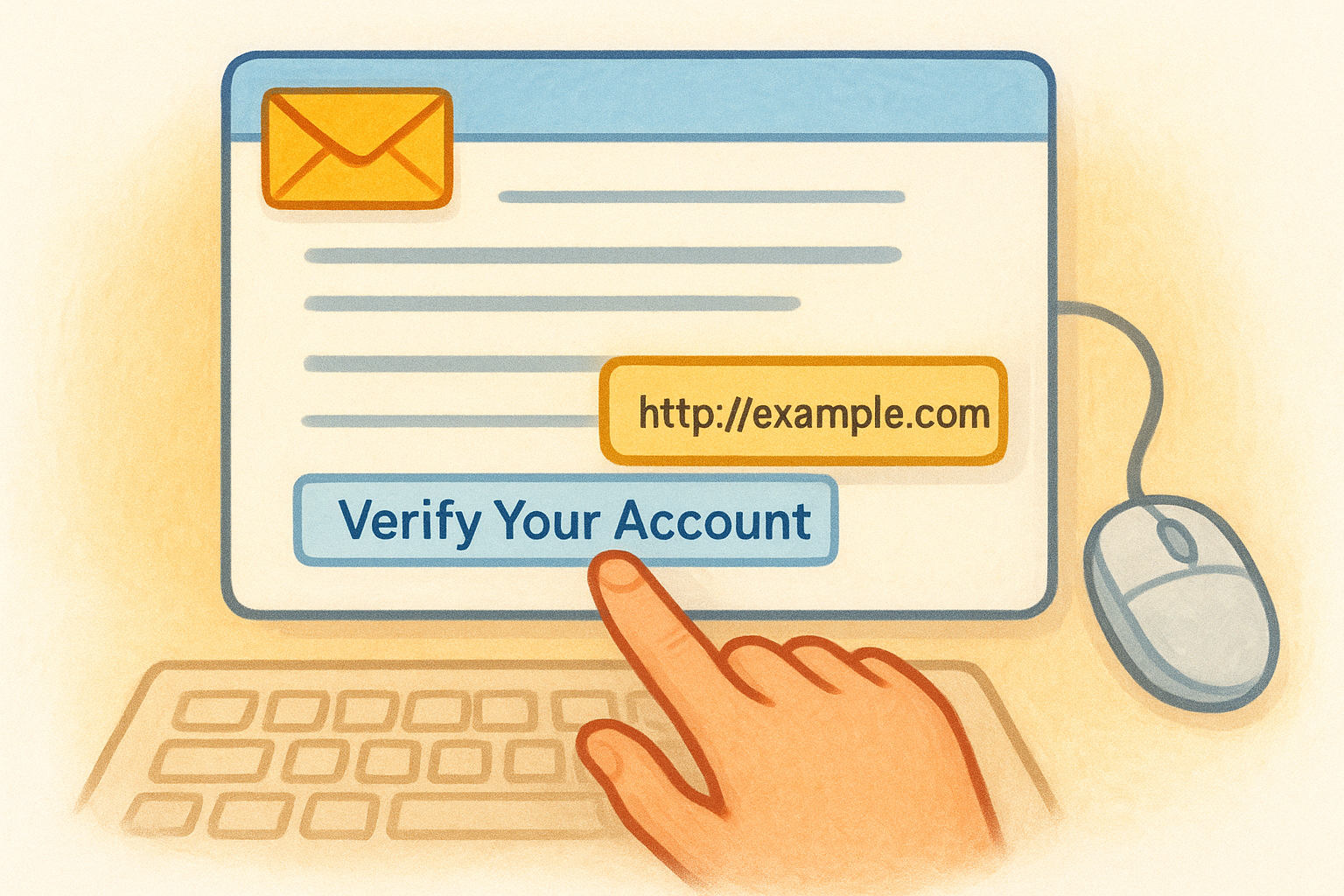
URL patterns that signal a fake login page
Scammers create login pages that look identical to real platforms but live on fraudulent domains. Watch for extra words before the legitimate domain name, like secure-coinbase-login.com instead of coinbase.com, or subdomains that add unnecessary prefixes such as login.verification.ledger.scam-site.com. Legitimate login pages always use the company's primary domain without creative additions.
The real domain sits immediately before the first single forward slash in a URL, not buried in subdomains or prefixes.
How attackers disguise links in buttons and images
Buttons labeled "Confirm Transaction" or "Secure My Account" hide the actual destination URL until you hover over them. Images that look like official logos can also function as clickable links leading to phishing sites. Always hover before clicking any visual element in an email, regardless of how official it appears.
What to do if you already clicked
Close the browser tab immediately without entering any information if you realize you clicked a suspicious link. Change your passwords through the official platform using a fresh browser session, and enable two-factor authentication if you haven't already. Monitor your account for unauthorized activity and consider moving funds to a hardware wallet under your exclusive control.
4. Watch for urgency and emotional pressure
Scammers manipulate your emotions to bypass rational thinking and force immediate action. Recognizing how to spot a phishing email includes identifying psychological manipulation tactics that create artificial time pressure, making you believe you'll lose access, miss an opportunity, or face financial consequences if you don't respond instantly. Legitimate companies give you time to verify and respond without threatening consequences.
Common "act now" scripts scammers use
Phishing messages deploy familiar urgency patterns that sound official but serve to panic you into compliance. You'll see phrases like "verify within 24 hours or lose access," "suspicious activity detected," or "final notice before account suspension." These scripts exploit your fear of loss and create false deadlines that don't exist in legitimate communications.
How to slow down and regain control
Close the email and take a five-minute break before making any decisions. Log into your account through the official website you bookmarked, not through email links, to check if any alerts actually exist. Contact support through verified channels if you need clarification, giving yourself permission to ignore arbitrary deadlines imposed by a potentially fraudulent message.
Real security issues allow time for verification through official channels, not instant responses to random emails.
Signs of intimidation, rewards, and fear tactics
Watch for language that threatens account closure, promises unexpected refunds, or warns of unauthorized access you supposedly triggered. Emotional extremes signal manipulation, whether the message frightens you with warnings or excites you with surprise bonuses and promotional offers you didn't request.
What to do when a message feels time-sensitive
Verify the claim through independent research before taking action. Search the company's official announcements, check their verified social media accounts, or call their published support number to confirm whether the urgent matter actually exists.
5. Don't trust requests for secrets or surprise files
No legitimate cryptocurrency platform will ever ask for sensitive credentials through email, and understanding this rule helps you recognize how to spot a phishing email instantly. Attackers send messages requesting private keys, seed phrases, passwords, or two-factor codes because these secrets give them complete control over your assets. Unexpected attachments claiming to be invoices, security updates, or account statements deliver malware designed to steal your information or monitor your activity.
Information legitimate companies won't ask for by email
Exchanges and wallet providers never request your password, seed phrase, private key, or 2FA codes through email. They don't need this information because they already have secure systems that authenticate you directly through their platforms.
Seed phrase and private key bait you must never follow
Any message asking you to "verify" or "backup" your seed phrase through a link represents a direct theft attempt. Your recovery phrase exists solely for offline storage, never for submission through websites or email forms.
Legitimate companies know your seed phrase doesn't belong to them and will never ask you to share it.
Attachment and invoice scams that deliver malware
Unexpected attachments labeled as invoices, tax documents, or security certificates contain executable files or malicious scripts that install keyloggers and credential stealers on your device.
What to do if you replied, shared info, or opened a file
Move your cryptocurrency to a new wallet with a fresh seed phrase immediately if you disclosed any credentials. Run updated antivirus software if you opened an attachment, and change all passwords through official platforms.
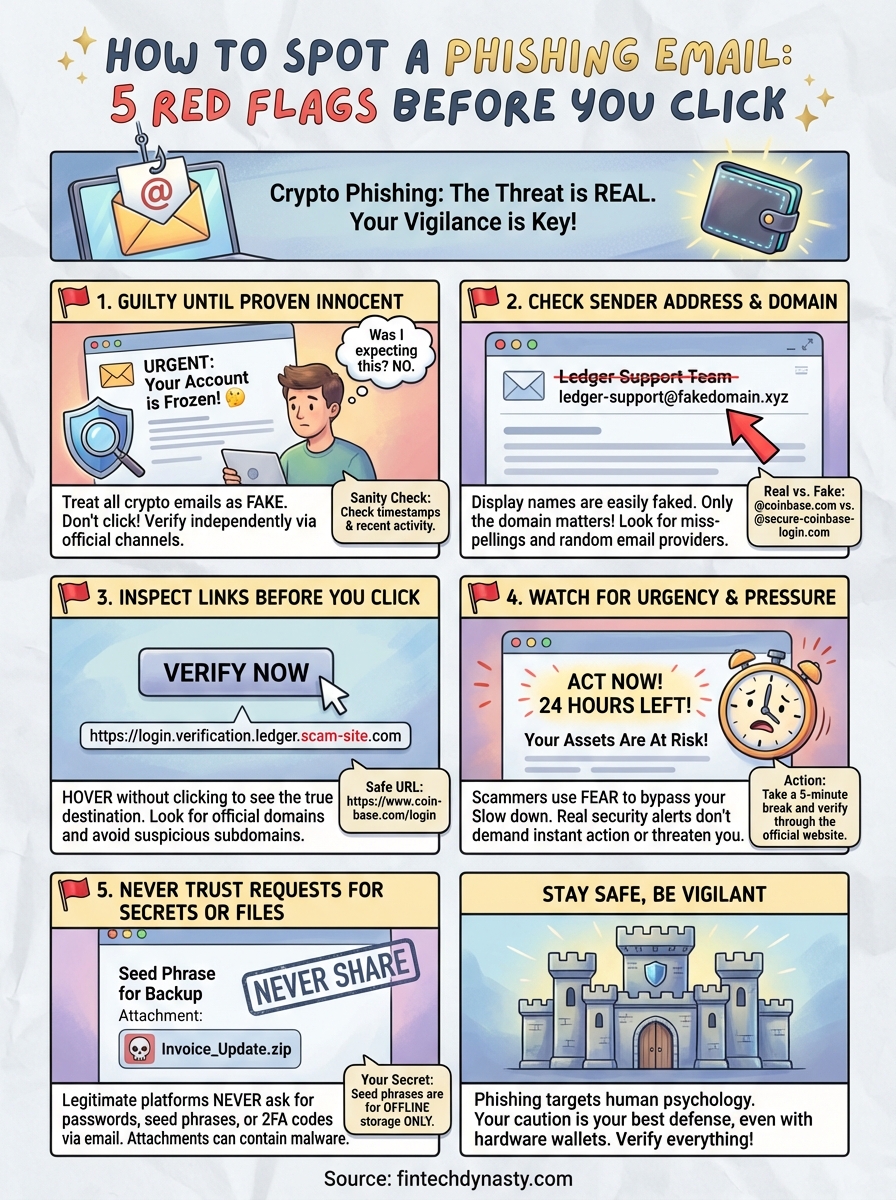
Stay safe before you click
Learning how to spot a phishing email protects you from the single largest threat vector that bypasses even the best hardware wallet security. The five red flags we covered give you a practical framework for identifying fraud before it reaches your assets: treating crypto emails as guilty until proven innocent, examining sender domains for subtle spoofs, hovering over links to reveal fake destinations, recognizing artificial urgency that manipulates your emotions, and refusing any request for sensitive credentials or unexpected attachments.
Your vigilance matters more than any security tool because phishing targets human psychology, not technical systems. Apply these verification steps to every message that mentions your cryptocurrency accounts, exchange activity, or wallet security. Hardware wallets protect your private keys from remote attacks, but they can't stop you from manually entering your seed phrase into a fraudulent website. Build these habits now, verify everything independently, and never let urgency override your judgment. For comprehensive guidance on protecting your digital assets beyond email security, explore the resources at FinTech Dynasty where we focus on practical crypto safety without the hype.